


Alarm Description
Pod restart:
- Containers related to basic platform workload (ocloud-osp-passwd-svr): Pod restarts due to certain abnormalities.
- Containers related to audit log workload (t|ocloud-cloudaudit): Pod restarts due to certain abnormalities.
- Containers related to CAM workload (t|ocloud-tcenter-cam/tcloud-tcenter-support-cam): Pod restarts due to certain abnormalities.
- Containers related to tag workload (tcloud-tcenter-platform-tag/tcloud-tcenter-platform-wtag): Pod restarts due to certain abnormalities.
- Containers related to cloud API management workload (cloud-tcenter-yunapi3): Pod restarts due to certain abnormalities.
Alarm Attributes
| Module | Name | Event Level | Manual/Automatic Clearing |
|---|---|---|---|
| Default alarm policy for tcs-kube_state metric monitoring | Pod restart | Level 2 alarm | Automatic clearing |
Impact on the System
No impact.
Possible Causes
| No. | Cause | Description |
|---|---|---|
| 1 | Resource Limitations | - Memory limit: This is usually accompanied by the "Pod actual memory utilization (relative to the limit) exceeds the threshold" alarm. If the memory used by the container exceeds the defined limit, Kubernetes will kill the container, resulting in a restart. In such cases, the cause of insufficient memory needs to be confirmed with technical support. Possible causes include: - The memory limit assigned to the pod is too small and needs to be increased. - The application may have a memory leak, causing usage to increase gradually and eventually exceed the limit. The program's memory reclamation mechanism needs optimization. - CPU limit: This is usually accompanied by the "Pod CPU utilization (relative to the limit) exceeds the threshold" alarm. Although the CPU limit does not directly cause container restarts, if the container fails to function properly due to insufficient CPU resources, it may crash. In such cases, the cause of insufficient CPU resources needs to be confirmed with technical support. Possible causes include: - The CPU resource limit assigned to the pod is too small and needs to be increased. - The application may have abnormalities, causing its CPU usage to increase gradually and eventually exceed the limit. The program logic needs optimization. |
| 2 | Health check failure | Liveness probe: If a liveness probe is configured and detects that the container is unhealthy, Kubernetes will restart the container. For container health issues, please contact technical support to confirm whether the workload service is functioning normally and to identify the root cause. |
| 3 | Node issue | If a node fault occurs, all services running on that node will be abnormal. This type of issue is handled at the TCS layer and does not require attention from the business side. |
Processing Procedures
Query the status information of the pod when its most recent run ended:
- Basic platform workload: kubectl describe pod -n tce ocloud-osp-passwd-svr-xxx | grep -A 5 'Last State:'
- Audit log workload: kubectl describe pod -n tce t|ocloud-cloudaudit-xxx | grep -A 5 'Last State:'
- CAM workload: kubectl describe pod -n tce t|ocloud-tcenter-cam/tcloud-tcenter-support-cam-xxx | grep -A 5 'Last State:'
- Tag workload: kubectl describe pod -n tce tcloud-tcenter-platform-tag/tcloud-tcenter-platform-wtag-xxx | grep -A 5 'Last State:'
- Cloud API management workload: kubectl describe pod -n tce cloud-tcenter-yunapi3-xxx | grep -A 5 'Last State:'
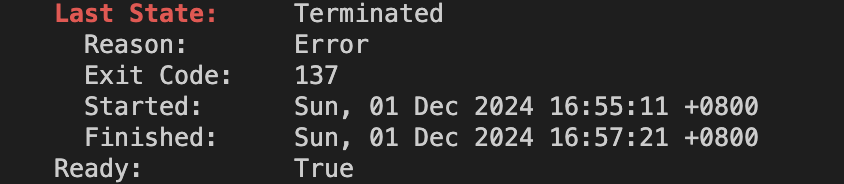
Note:
The main focus here is on the reason and exit code sections:
- exitCode: The exit code of the container.
- reason: the reason for termination, such as Error (an error occurred) or OOMKilled (terminated due to out-of-memory issues).
Check the event status of the pod:
- Basic platform workload: kubectl describe pod -n tce ocloud-osp-passwd-svr-xxx | grep -A 10 'Events:'
- Audit log workload: kubectl describe pod -n tce t|ocloud-cloudaudit-xxx | grep -A 10 'Events:'
- CAM workload: kubectl describe pod -n tce t|ocloud-tcenter-cam/tcloud-tcenter-support-cam-xxx | grep -A 10 'Events:'
- Tag workload: kubectl describe pod -n tce tcloud-tcenter-platform-tag/tcloud-tcenter-platform-wtag-xxx | grep -A 10 'Events:'
- Cloud API management workload: kubectl describe pod -n tce cloud-tcenter-yunapi3-xxx | grep -A 10 'Events:'
Collect log information from the fault occurrence time and contact technical support for assistance. Log path: /data/log.
