

Tenant Cloud
TCenter
Cloud Access Management
Ops Management Guide
Contingency Plan for Pod Actual Memory Utilization (Relative to the Limit) Exceeding the Threshold
Contingency Plan for Pod Actual Memory Utilization (Relative to the Limit) Exceeding the Threshold
Last Updated At: 2026-08-14 08:08:00

Alarm Description
Pod actual memory utilization (relative to the limit) exceeds the threshold:
- Containers related to basic platform workload (cloud-tcenter): Due to certain abnormalities, memory utilization becomes high, exceeding 95% of the configured limit.
- Containers related to audit log workload (t|ocloud-cloudaudit): Due to certain abnormalities, memory utilization becomes high, exceeding 95% of the configured limit.
- Containers related to CAM workload (t/ocloud-tcenter-cam/tcloud-tcenter-support-cam): Due to certain abnormalities, memory utilization becomes high, exceeding 95% of the configured limit.
- Containers related to tag workload (tcloud-tcenter-platform-tag/tcloud-tcenter-platform-wtag): Due to certain abnormalities, memory utilization becomes high, exceeding 95% of the configured limit.
- Containers related to cloud API management workload (cloud-tcenter-yunapi3): Due to certain abnormalities, memory utilization becomes high, exceeding 95% of the configured limit.
Alarm Attributes
| Module | Event Name | Event Level | Manual/Automatic Clearing |
|---|---|---|---|
| Default alarm policy for tcs-pod metric monitoring | Pod actual memory utilization (relative to the limit) exceeding the threshold | Level 2 alarm | Automatic clearing |
Impact on the System
No impact.
Possible Causes
- The memory limit assigned to the pod is too small and needs to be increased.
- The application may have a memory leak, causing usage to increase gradually and eventually exceed the limit. The program's memory reclamation mechanism needs optimization.
Processing Procedures
Check pod resource limits:
- Basic platform workload: kubectl describe pod -n tce cloud-tcenter-xxx | grep -A 5 'Limits:'
- Audit log workload: kubectl describe pod -n tce t|ocloud-cloudaudit-xxx | grep -A 5 'Limits:'
- CAM workload: kubectl describe pod -n tce t|ocloud-tcenter-cam/tcloud-tcenter-support-cam | grep -A 5 'Limits:'
- Tag workload: kubectl describe pod -n tce tcloud-tcenter-platform-tag/tcloud-tcenter-platform-wtag-xxx | grep -A 5 'Limits:'
- Cloud API management workload: kubectl describe pod -n tce cloud-tcenter-yunapi3-xxx | grep -A 5 'Limits:'
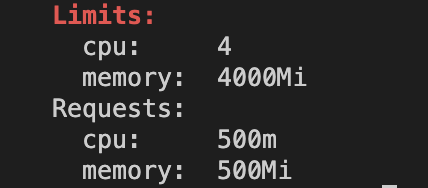
View historical monitoring information of pod:
Log in to the operation side, choose Monitoring System (CWhistle) > Cloud Product Metric > TCS/Pod, query the memory utilization monitoring data of the Pod that triggered the alarm around the time the alarm was triggered or for a longer period, and determine whether the behavior is normal.Time Range The day of the fault Monitoring Metric pod_memory_nocache_limit_usage Cluster global Namespace tce Pod - Basic platform workload: cloud-tcenter-xxx
- Audit log workload: t\|ocloud-cloudaudit-xxx
- CAM workload: t\|ocloud-tcenter-cam/tcloud-tcenter-support-cam
- Tag workload: tcloud-tcenter-platform-tag/tcloud-tcenter-platform-wtag-xxx
- Cloud API management workload: cloud-tcenter-yunapi3-xxx
Collect relevant information and contact the technical team for support.
