Measuring Metrics
Since different applications have different workloads, if the I/O requests provided are not sufficient to fully utilize the cloud disk, the maximum performance of the cloud disk may not be achieved.
Generally, the following metrics are used to measure cloud disk performance:
- IOPS: Number of reads/writes per second with units in counts. The underlying driver type of the storage device determines different IOPS.
- Throughput: the amount of read and write data per second in MB/s.
- Delay: the time from sending I/O operation to receiving and confirmation in seconds.
Testing Tool
FIO is a tool for testing disk performance, which is used for stress tests on hardware and verification. This document takes FIO as an example.
When using FIO, it is recommended to use libaio's I/O engine for testing. Install FIO and libaio yourself.
Warning:
- Do not perform an FIO test on the system disk to avoid damaging important files of the system.
- To avoid data corruption caused by metadata corruption of the underlying file system, do not test on the business data disk.
- Ensure that there is no mounting configuration for the hard disk under test in the
/etc/fstabfile configuration item. Otherwise, the CVM will fail to start.
Suggestions for Test Object
- It is recommended to perform the FIO test on a free hard disk that has not saved important data and rebuild the file system of the tested hard disk after the test.
- When testing the performance of hard disks, it is recommended to directly test raw data disks (such as /dev/vdb).
- When testing file system performance, it is recommended to specify a specific file test (such as /data/file).
Test Examples
The test formulas for different scenes are basically the same, except for rw, iodepth, and bs (block size). For example, the optimal iodepth for each workload varies depending on how sensitive your particular application is to IOPS and delay.
Parameter description:
| Parameter Name | Description | Example of Value |
|---|---|---|
| bs | Block size per request. Values include 4k, 8k, and 16k. | 4k |
| ioengine | I/O engine. Linux's asynchronous I/O engine is recommended. | libaio |
| iodepth | Requested I/O queue depth. | 1 |
| direct | Specify the direct mode. - True (1) indicates that the O_DIRECT marker B transparency is specified, the I/O cache is ignored, and data is written directly. - False (0) indicates that the O_DIRECT marker B transparency is not specified. The default value is True (1). |
1 |
| rw | Read and write mode. The values include read, write, randread, randwrite, randrw, and rw, read/write. | read |
| time_based | Specifies that the time mode is used. There is no need to set this parameter value as long as the FIO runs based on time. | N/A |
| runtime | Specifies the test duration, i.e., FIO run time. | 600 |
| refill_buffers | The FIO refills the I/O buffer with each submission. The default setting is to fill and reuse the data only initially. | N/A |
| norandommap | When performing random I/O, FIO will overwrite each block of the file. If this parameter is given, a new offset will be selected without viewing the I/O history. | N/A |
| randrepeat | Whether the random sequence is repeatable. - True (1) indicates that the random sequence is repeatable. - False (0) indicates that the random sequence is not repeatable. The default value is True (1). |
0 |
| group_reporting | When multiple jobs are running concurrently, the statistics of the whole group will be printed. | N/A |
| name | Name of job. | fio-read |
| size | Addressing space for I/O testing. | 100GB |
| filename | The test object, i.e., the name of the disk device to be tested. | /dev/sdb |
Common use cases are as follows:
bs = 4k iodepth = 1: random read/write test, which can reflect the delay performance of hard disk.
Execute the following command to test the random read delay of hard disks:fio -bs=4k -ioengine=libaio -iodepth=1 -direct=1 -rw=randread -time_based -runtime=600 -refill_buffers -norandommap -randrepeat=0 -group_reporting -name=fio-randread-lat --size=10G -filename=/dev/vdbExecute the following command to test the random write delay of hard disks:
fio -bs=4k -ioengine=libaio -iodepth=1 -direct=1 -rw=randwrite -time_based -runtime=600 -refill_buffers -norandommap -randrepeat=0 -group_reporting -name=fio-randwrite-lat --size=10G -filename=/dev/vdbExecute the following command to test the random mixed read-write latency performance of the Cloud SSD.
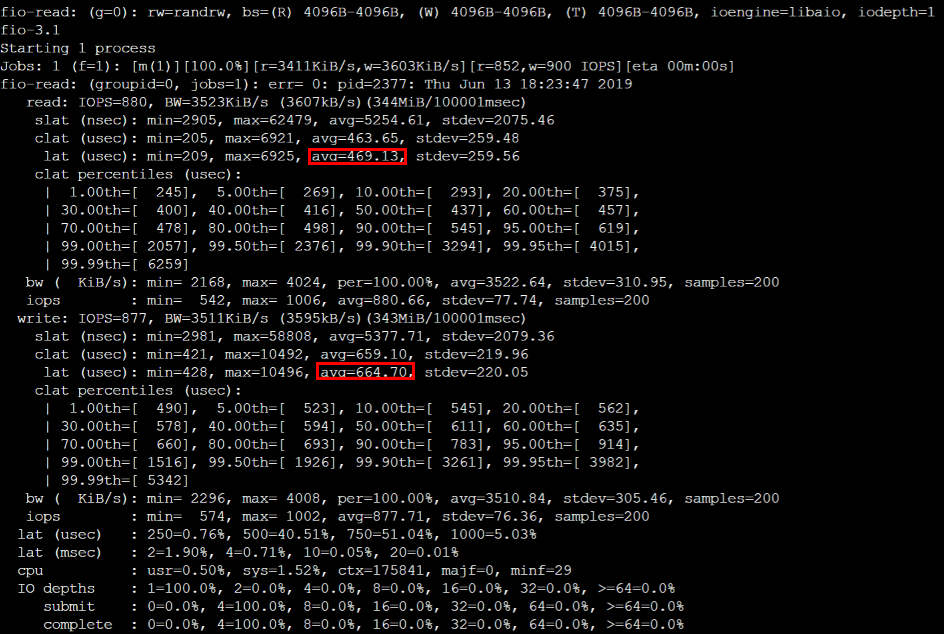
fio --bs=4k --ioengine=libaio --iodepth=1 --direct=1 --rw=randrw --time_based --runtime=100 --refill_buffers --norandommap --randrepeat=0 --group_reporting --name=fio-read --size=1G --filename=/dev/vdbThe test results are shown in the following figure:
bs = 128k iodepth = 32: sequential read/write test, which can reflect the throughput performance of hard disk.
Execute the following command to test the sequential read throughput bandwidth of the hard disk:fio -bs=128k -ioengine=libaio -iodepth=32 -direct=1 -rw=read -time_based -runtime=600 -refill_buffers -norandommap -randrepeat=0 -group_reporting -name=fio-read-throughput --size=10G -filename=/dev/vdbExecute the following command to test the sequential write throughput bandwidth of the hard disk:
fio -bs=128k -ioengine=libaio -iodepth=32 -direct=1 -rw=write -time_based -runtime=600 -refill_buffers -norandommap -randrepeat=0 -group_reporting -name=fio-write-throughput --size=10G -filename=/dev/vdbExecute the following command to test the sequential read throughput performance of the Cloud SSD.
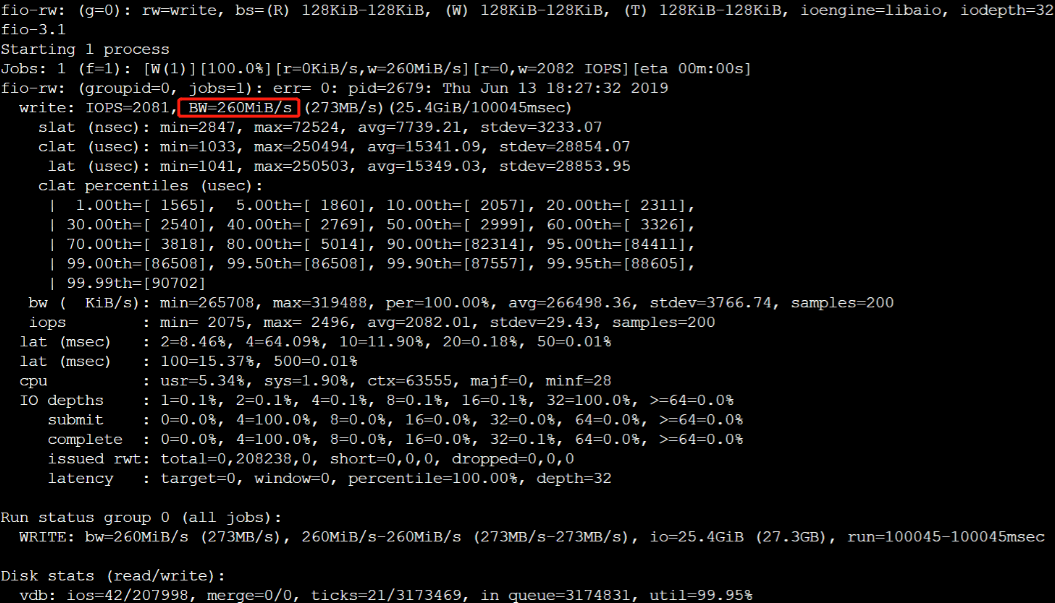
fio --bs=128k --ioengine=libaio --iodpth=32 --direct=1 --rw=write --time_based --runtime=100 --refill_buffers --norandommap --randrepeat=0 --group_reporting -rw --size=1G --filname=/dev/vdbThe test results are shown in the following figure:
bs = 4k iodepth = 32: random read/write test, which can reflect the IOPS performance of hard disk.
Execute the following command to test the random read IOPS of the hard disk.fio -bs=4k -ioengine=libaio -iodepth=32 -direct=1 -rw=randread -time_based -runtime=600 -refill_buffers -norandommap -randrepeat=0 -group_reporting -name=fio-randread-iops --size=10G -filename=/dev/vdbExecute the following command to test the random write IOPS of the hard disk.
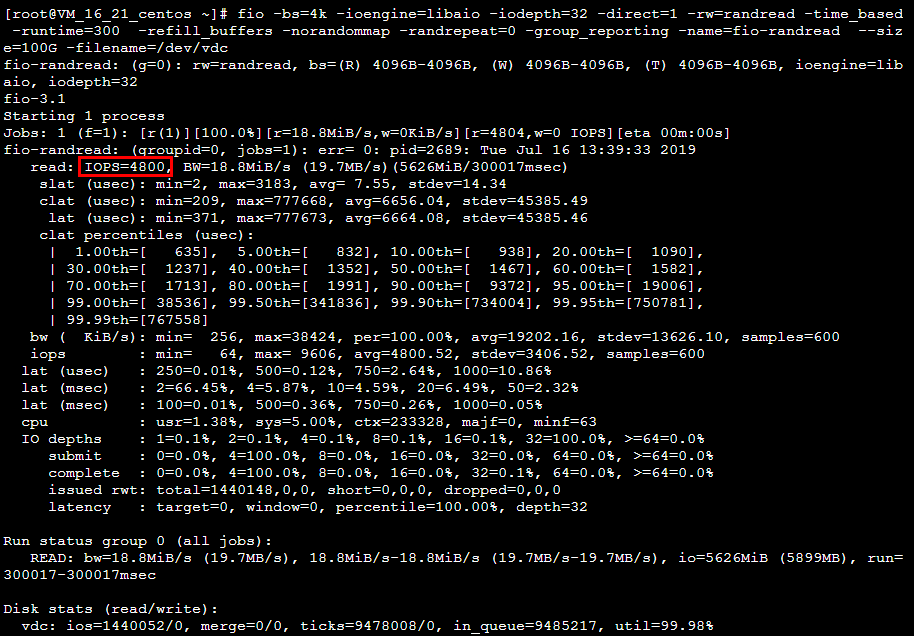
fio -bs=4k -ioengine=libaio -iodepth=32 -direct=1 -rw=randwrite -time_based -runtime=600 -refill_buffers -norandommap -randrepeat=0 -group_reporting -name=fio-randwrite-iops --size=10G -filename=/dev/vdbTest the random read IOPS performance of a Cloud SSD. As shown in the figure below: