

Description:
IPv6 NAT64 CLB does not support obtaining the client IP.
CLB supports creating the IPv6 NAT64 CLB instance. Converge Cloud will allocate an IPv6 public network address (VIP in the IPv6 Version) to the instance. The VIP will forward requests from the IPv6 client's end to the IPv4 CVM at the backend.
What is IPv6 NAT64 CLB
IPv6 NAT64 CLB is the Cloud Load Balancer implemented based on NAT64 IPv6 transition technology. With the IPv6 NAT64 CLB, the backend CVM can quickly access IPv6 users without any IPv6 transformation.
IPv6 NAT64 CLB Architecture
The architecture of the IPv6 NAT64 CLB is shown in the figure below.
When accessing the IPv6 NAT64 CLB through an IPv6 network, the CLB can seamlessly translate IPv6 addresses to IPv4 addresses, adapting to existing services and quickly enabling IPv6 transformation.
The Strengths of IPv6 NAT64 CLB
Converge Cloud IPv6 NAT64 CLB has the following strengths in helping businesses quickly access IPv6:
- Quick access: Access IPv6 in seconds and go online quickly as soon as you buy and use it.
- Smooth business transition: Businesses can smoothly access IPv6 only based on client modification, not requiring modifying any backend businesses. IPv6 NAT64 CLB supports the access from IPv6 clients and converts IPv6 messages into IPv4 messages. Applications on the backend CVMs do not need to be aware of IPv6 and can still be deployed and work in their original form.
- Easy to use: IPv6 NAT64 CLB is compatible with the original IPv4 CLB operation traffic, with zero learning cost and a low threshold for use.
Operation Guide
Creating the IPv6 NAT64 CLB
- Log in to the CLB console.
- Click the IPv6 Translation Instance in the left sidebar to enter the IPv6 Translation Instance page.
- Click Create and the Apply for IPv6 Translation Instance dialog box pops up.
- Name: Enter the instance name.
- AZ: Select the AZ where the CLB instance is located.
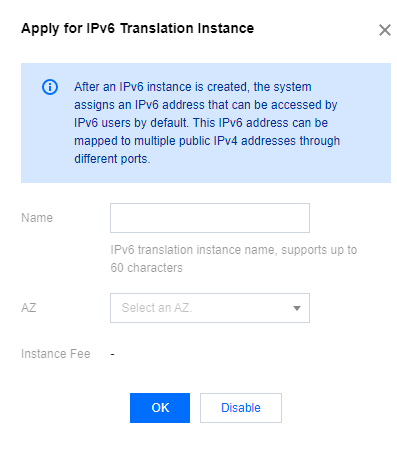
- Click OK to complete the creation of the instance.
Using the IPv6 NAT64 CLB
Click the instance ID to enter the Details page, where you can create a conversion rule.