

All connection applications must be initiated and completed in the console.
Console Application
- Log in to the Direct Connect console.
- In the left navigation bar, click Connection to enter the physical dedicated line interface.
- Click Create to apply for a connection.
To initiate the construction of a connection, users need to fill in the following information: After the construction application is initiated, the connection status will be converted to Application in Progress, and the operational end management staff will evaluate your DC application.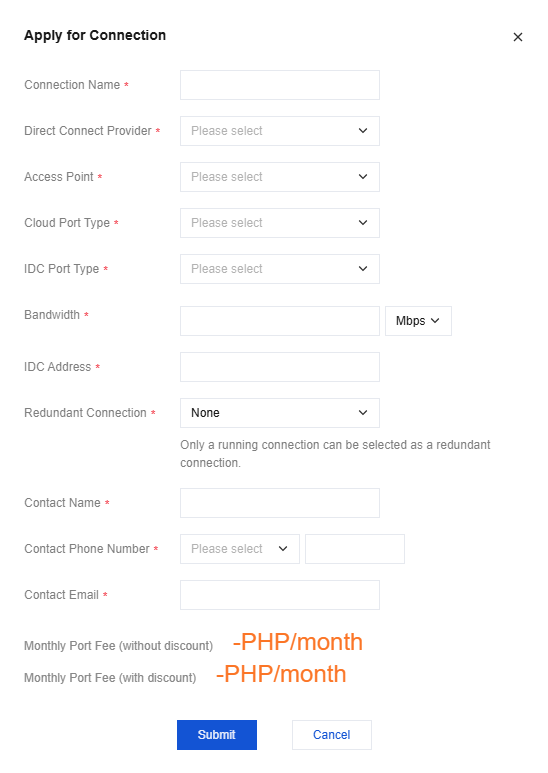
| Parameter | Description | Remark |
|---|---|---|
| Connection Name | Please customize the name of your connection. | Support changes |
| Direct Connect Provider | Includes the following options: China Telecom, China Mobile, China Unicom, Others in China (select this option for all domestic dedicated lines other than the three major operators), Others abroad (select this option for all overseas dedicated lines) | - |
| Access Point | For connections to the cloud platform, it is recommended to choose a nearby connection point. | The city where the connection point is located generally has at least 2 connection points, which can achieve dual-line disaster recovery. |
| Cloud Port Type | The Cloud port type used to interconnect the connection line with the Converge Cloud connection device | Select the corresponding API type according to bandwidth. You can consult your DC service provider or Converge Cloud architect/after-sales manager for technical support. |
| IDC Port Type | The IDC port type used to connect the IDC connection to the Converge Cloud connection device | Select the corresponding API type according to bandwidth. You can consult your DC service provider or Converge Cloud architect/after-sales manager for technical support. |
| IDC Address | Province, city, detailed address | Please provide IDC address details as precisely as possible, including the specific floor. |
| Bandwidth | Support 2 to 100,000 Mbps | - |
| Redundant Connection | Select the corresponding connection as the primary and backup relationship to avoid linking two connection lines to the same connection device and ultimately prevent single point failure. | The selection of the primary-backup relationship is mainly to avoid dual-line connection to the same point. The primary-backup relationship of the DC tunnel needs to be applied in the DC tunnel sub-product. |
| Contact Name | Name of the DC contact person | - |
| Contact Phone Number | DC contact person's phone number | - |
| Contact Email | Email of DC contact person | - |
Construction acceptance
After the management completes the evaluation and gives the go ahead, they will coordinate relevant resources to assist in building connections. After the connection is built, it will automatically enter the operating status.