Querying Monitoring Metrics: Guide for Calling the GetMonitorData API
Last Updated At: 2026-08-14 08:08:00
API Call Guide
- API description
| API Name | Version | API Feature |
|---|---|---|
| GetMonitorData | 2018-07-24 | Pulls the monitoring data of cloud product metrics. |
- Input parameters
| Parameter Name | Required | Type | Description |
|---|---|---|---|
| Namespace | Yes | String | Namespace, such as qce/cvm. Example value: qce/cvm. |
| MetricName | Yes | String | Metric name, such as cpu_usage. Only single-metric pulling is supported. Example value: cpu_usage |
| Dimensions | Yes | Array | Dimensions of instance objects, in the form of a collection of key-value pairs. This field varies with the instance types. For example, this field is [{"unInstanceId": "ins-miltleuc"}] for a CVM instance. Each request supports batch retrieval of monitoring data for up to 10 instances. Example value: [{"unInstanceId": "ins-miltleuc"}, {"unInstanceId": "ins-4xny0cbt"}] |
| Period | Yes | Integer | Monitoring statistical period, such as 60, in seconds. The statistical period supported by each metric may not be the same. For the statistical periods supported by each cloud product, see the appendix of this document. The maximum number of data points of a single request is 1,440. Example value: 300. |
| StartTime | Yes | Time | Start time, for example, 2018-09-22T19:51:23+08:00. Example value: 2019-03-24T10:51:23+08:00. |
| EndTime | Yes | Time | End time, such as 2018-09-22T20:51:23+08:00. The current time is used by default. EndTime cannot be earlier than StartTime. Example value: 2019-03-24T20:51:23+08:00. |
- Request domain name
API request domain name: monitor.api3.${domain_main}, such as monitor.api3.3100light2az.fsphere.cn.Note:
${domain_main} can be obtained by logging into any Pod and searching for the domain_main keyword in /tce/conf/cm/local.json.

4. Request region
Since monitoring data is reported and stored by region, it is necessary to explicitly specify the region where the instance to be pulled is located when an API is called. The method to obtain region information is as follows:
Log in to any Pod, open /tce/conf/cm/local.json, search for the region_list keyword, and the region_name indicates available regions.
5. Calling frequency limit
Default API request frequency limit: 20 times/second.
6. Output parameters
| Parameter Name | Type | Description |
|---|---|---|
| MetricName | String | Metric name. Example value: cpu_usage. |
| Period | Integer | Monitoring statistical period. Example value: 60. |
| DataPoints[].Dimensions | Json | Instance object dimension group. Example value: {"unInstanceId": "ins-miltleuc"}. |
| DataPoints[].Points | Array | Data point array. |
| StartTime | Time | Start time. Example value: 2019-03-24T10:50:00+08:00. |
| EndTime | Time | End time. Example value: 2019-03-24T20:50:00+08:00. |
| RequestId | String | Unique request ID. It is generated by the server and is returned for each request. (No RequestId is returned if the request is not received by the server due to certain reasons.) RequestId is required for locating an issue. |
API Call Example
Scenario: Retrieve CPU utilization monitoring data for a CVM instance over a specified time range, with a 5-minute statistical period.
- Input example
POST HTTP/1.1
Host: monitor.api3.3100light2az.fsphere.cn
Content-Type: application/json
Action: GetMonitorData
{
    "Namespace": "qce/cvm",
    "MetricName": "CPUUsage",
    "Period": 300,
    "Dimensions": [
        {
            "unInstanceId": "ins-miltleuc"
        }
    ],
    "StartTime": "2024-03-24T10:51:23+08:00",
    "EndTime": "2024-03-24T20:51:23+08:00"
}
- Output example
{
    "Response": {
        "StartTime": "2019-03-24 10:50:00",
        "EndTime": "2019-03-24 20:50:00",
        "Period": 300,
        "MetricName": "cpu_usage",
        "DataPoints": [
            {
                "Dimensions": {
                        "unInstanceId": "ins-miltleuc"},
                "Points": [
                    2.566,
                    2.283,
                    6.316,
                    2.816,
                    2.7,
                    2.35
                ]
            }
        ],
       "RequestId": "d96ec542-6547-4af2-91ac-fee85c1b8b85"
    }
}
SDK Code Call
Pull CPU utilization monitoring data with a 5-minute statistical period for a CVM instance over a period.
- Golang example
package main

import (
    "fmt"

    "github.com/tcecloud/tcecloud-sdk-go/tcecloud/common"
    "github.com/tcecloud/tcecloud-sdk-go/tcecloud/common/errors"
    "github.com/tcecloud/tcecloud-sdk-go/tcecloud/common/profile"
    monitor "github.com/tcecloud/tcecloud-sdk-go/tcecloud/monitor/v20170312"
)

func main() {
    secretId := "AKIDxxxxxxxxxxxxxxxxxxxxxxxxxxxxxxxx"        // Calling credentials. Refer to the appendix.
    secretKey := "eyzi69sGK3SWFeiblb8NKwD9l2yZplNf"           // Calling credentials. Refer to the appendix.

    credential := common.NewCredential(secretId, secretKey)
    cpf := profile.NewClientProfile()
    cpf.HttpProfile.Scheme = "HTTP"
    cpf.HttpProfile.ReqTimeout = 10
    cpf.HttpProfile.Endpoint = "monitor.api3.3100light2az.fsphere.cn"      // Calling domain name. Refer to 3. Request Domain Name in this chapter.
    client, _ := monitor.NewClient(credential, "city1", cpf)               // Region where the monitoring data of cloud product instances is located. Refer to 4. Request Region in this chapter.

    request := monitor.NewGetMonitorDataRequest()

    request.Namespace = common.StringPtr("qce/cvm")
    request.MetricName = common.StringPtr("cpu_usage")
    request.Period = common.Uint64Ptr(60)
    request.StartTime = common.StringPtr("2024-10-17T15:10:42+08:00")
    request.EndTime = common.StringPtr("2024-10-17T16:10:42+08:00")

    // Build the Dimensions field.
    dimensions := []string{
        "{\"unInstanceId\": \"ins-miltleuc\"}",
    }
    request.Dimensions = common.StringPtrs(dimensions)
    response, err := client.GetMonitorData(request)

    if _, ok := err.(*errors.CloudSDKError); ok {
        fmt.Printf("An API error has returned: %s", err)
        return
    }
    // Non-SDK exception, direct failure. Other processing can be added to the actual code.
    if err != nil {
        panic(err)
    }
    // Print the returned json string
    fmt.Printf("%s", response.ToJsonString())
}
- Python example
# -*- coding: utf8 -*-
#
import json
from tcecloud.common import credential
from tcecloud.common.exception.cloud_sdk_exception import CloudSDKException
from tcecloud.monitor.v20170312 import monitor_client, models
from tcecloud.common.profile.client_profile import ClientProfile
from tcecloud.common.profile.http_profile import HttpProfile
import ssl

ssl._create_default_https_context = ssl._create_unverified_context

try:
    secret_id = "AKIDxxxxxxxxxxxxxxxxxxxxxxxxxxxxxxxx"           # Calling credentials. Refer to the appendix.
    secret_key = "1qVuzkBH3WgWhX3F7LJyJJyIJ0NP77rM"              # Calling credentials. Refer to the appendix.
    cred = credential.Credential(secret_id, secret_key)

    httpProfile = HttpProfile()
    httpProfile.endpoint = "monitor.api3.3100light2az.fsphere.cn"           # Calling domain name. Refer to 3. Request Domain Name in this chapter.

    clientProfile = ClientProfile()
    clientProfile.httpProfile = httpProfile
    client = monitor_client.MonitorClient(cred, "city1", clientProfile)     # Region where the monitoring data of cloud product instances is located. Refer to 4. Request Region in this chapter.

    req = models.GetMonitorDataRequest()
    params = {
        "Namespace": "qce/cvm",
        "MetricName": "cpu_usage",
        "Period": 60,
        "StartTime": "2024-10-17T15:10:42+08:00",
        "EndTime": "2024-10-17T16:10:42+08:00",
        "Dimensions": ['''{"unInstanceId": "ins-miltleuc"}''']
    }
    req.from_json_string(json.dumps(params))
    resp = client.GetMonitorData(req)

    # Output json format string back package
    print(resp.to_json_string(indent=2))

except CloudSDKException as err:
    print(err)
Appendix: Calling Credentials Creation Process
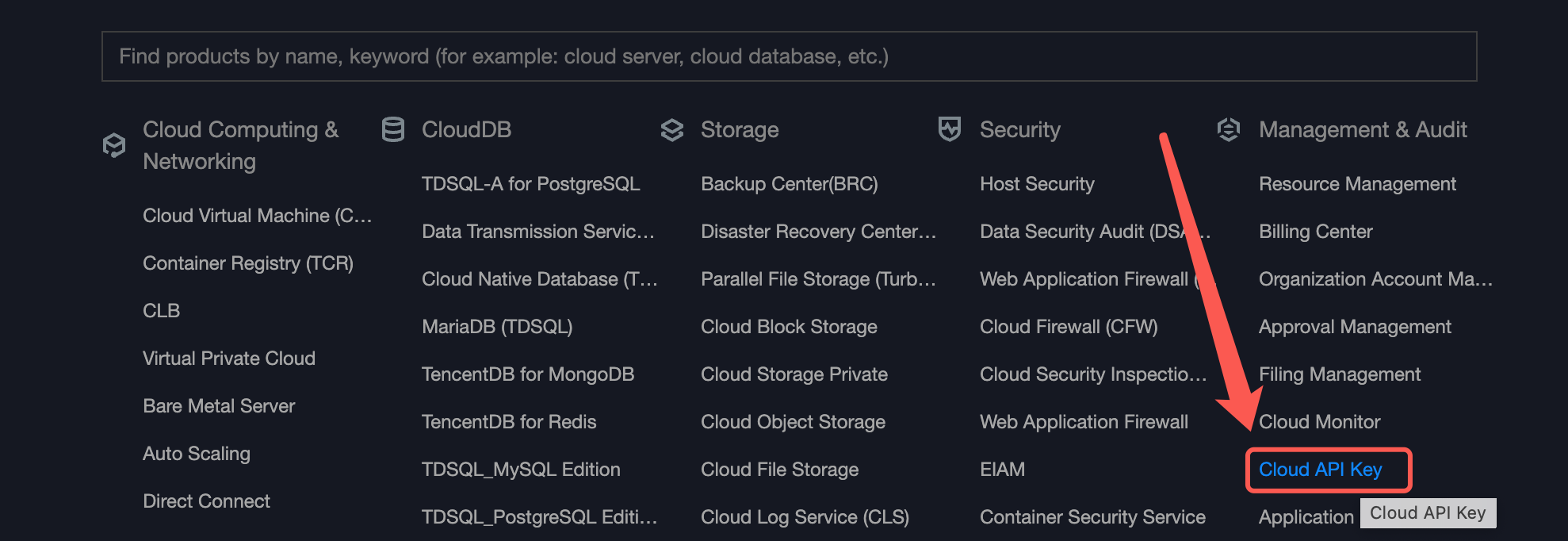
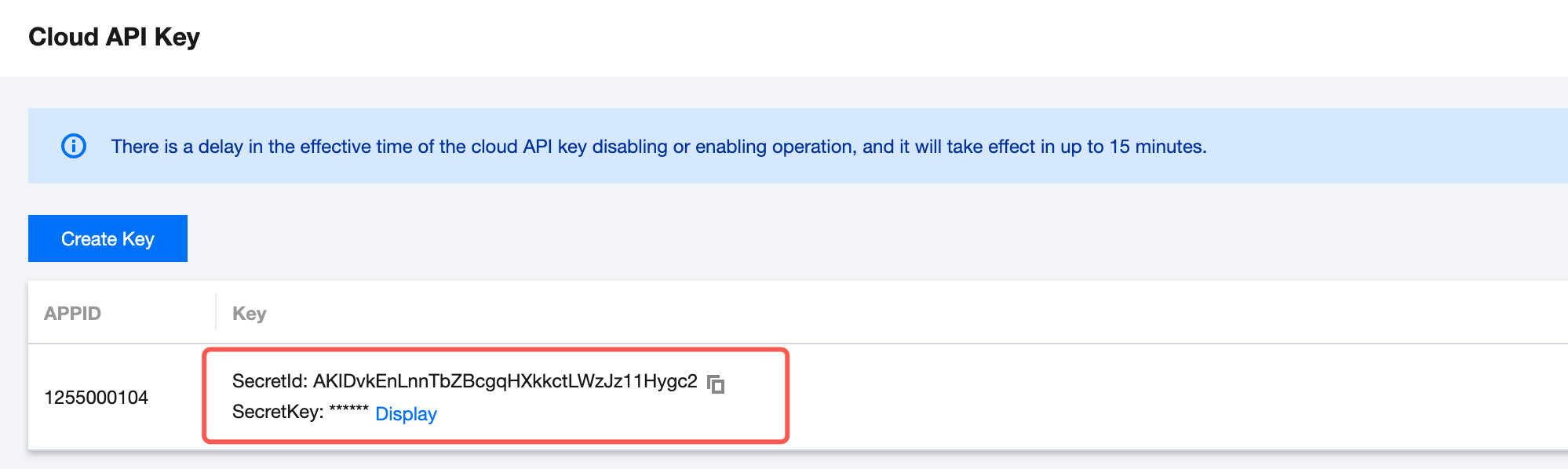
- Calling credentials: used for calling authentication, which means that the called AppID and UIN can be identified based on secretId and secretKey.
- Creation process: