

- No monitoring data of the connection, DC tunnel, and dedicated gateway
Symptom: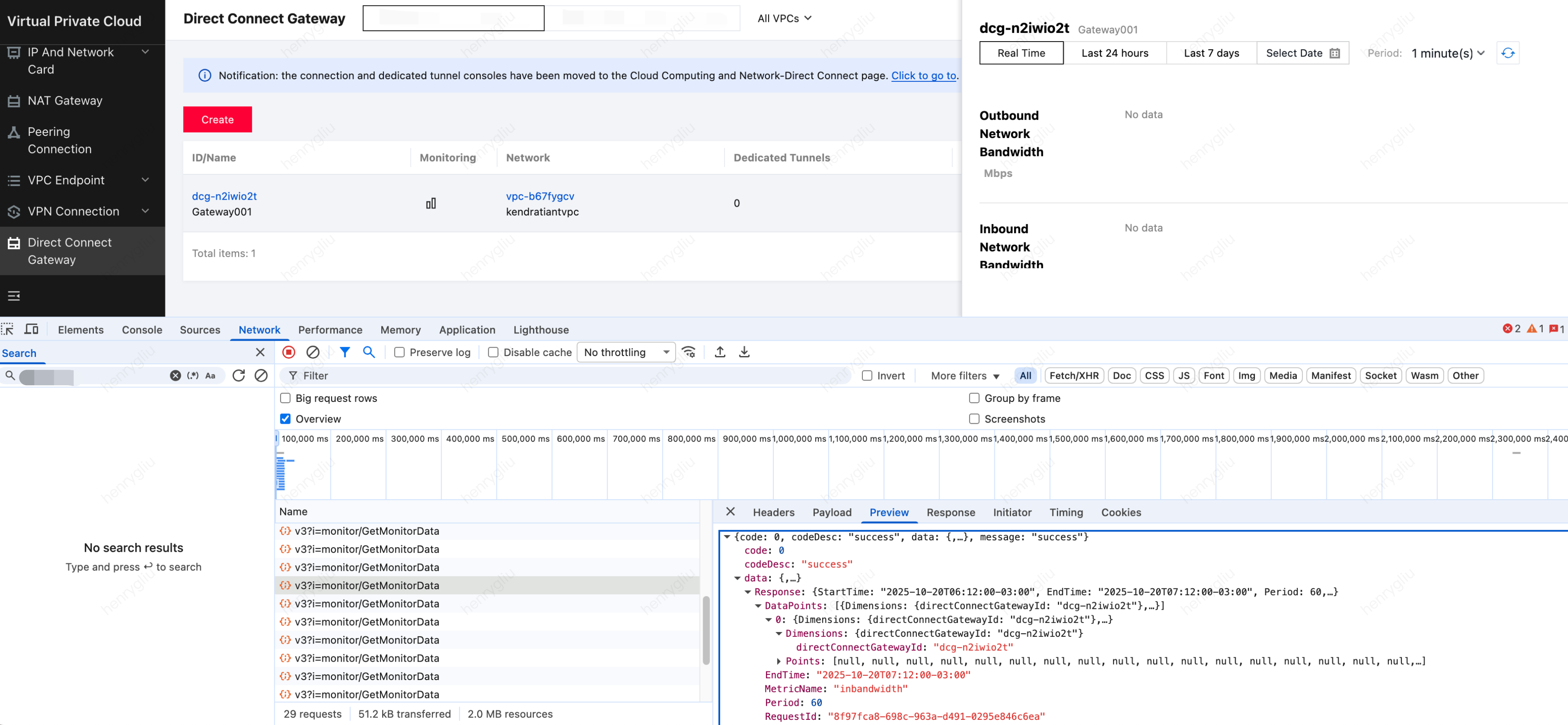
- No data is observed on the frontend. Press F12 to obtain the frontNameSpace and frontMetricName of the input parameters.
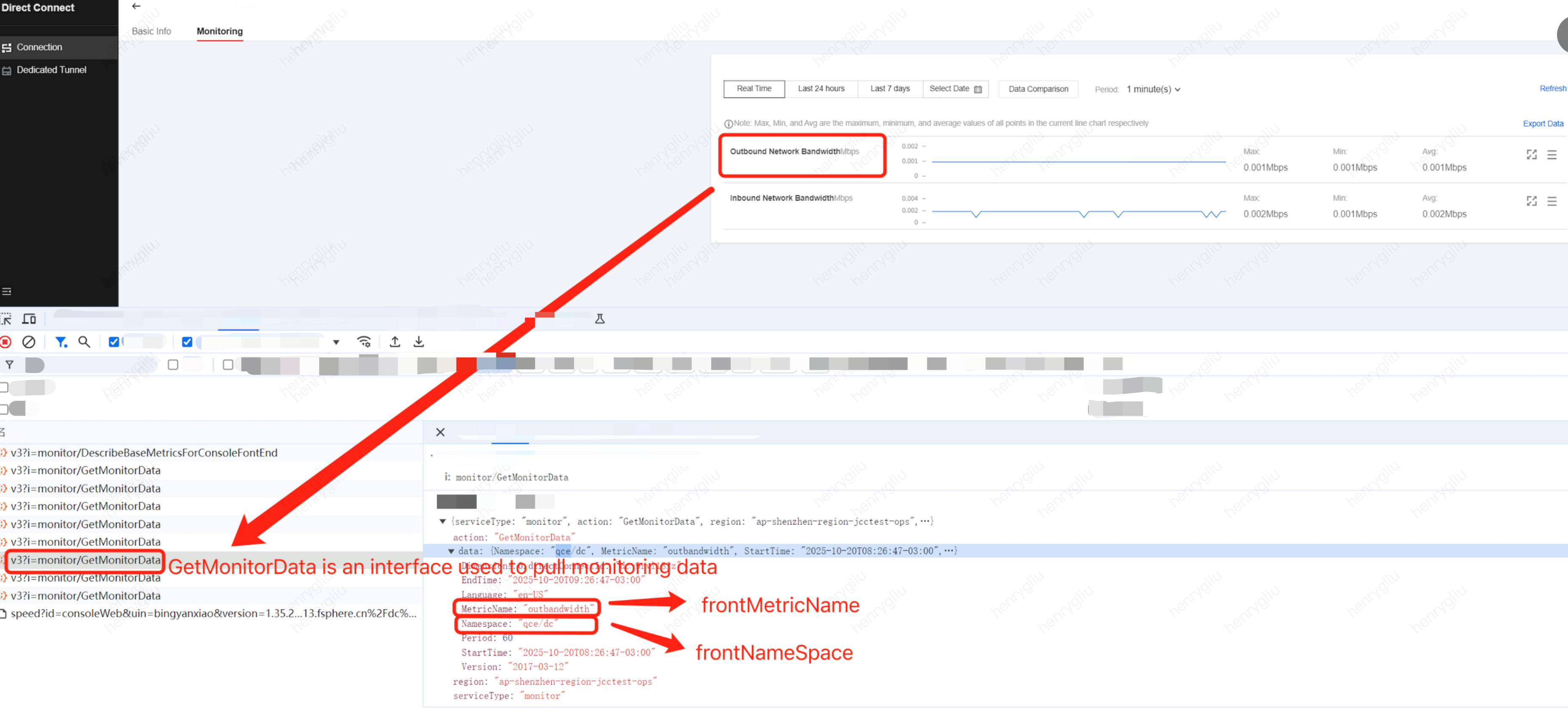
- Use frontNameSpace and frontMetricName obtained from frontend packet capture in backend packet capture to check whether any data is reported. Manual packet capture: Access the regional database of the Cloud Monitor database. (Generally, mysql22003 supports directly accessing the regional database. An alias is used for the database. If mysql22003 does not support accessing the regional database in the customer's environment, use the actual port of the customer's environment.)
For example, select *from StormCloudConf.cApiMetric where frontNameSpace = 'qce/dc';
Query the mapped backend namespace and backend metrics, and then perform packet capture in barad-nwspod, for example, tcpdump -i any -s0 -nn -A 'dst port 80'|grep'qce/dc' |grep 'inbandwidth'. - Confirm whether there is a problem with the access configuration, for example, whether the front-end reports a network error. Check whether the database has the namespace access configuration. Compare with the archived .db file, the following methods can basically confirm whether there is a problem with the access configuration. Detect and find whether qce/dc, qce/dcx and qce/dcg are accessed.
- Observe whether the left side of the page of the monitoring configuration center provided by barad-isd lacks the related namespace. Sample address: http://isd.barad.Example.com. (The specific domain can be obtained from the TCS master, kubectl get ingress -A |grepisd.barad.)
- For example, execute select * from cShowProductConfig where namespace = '{$namespace}' in the primary database of StormCloudConf; no record is found.
- select * from cApiMetric where namespace = '{$namespace}'; no data exists or the data does not match. A special case is that no API metrics are received.
- select * from cObservationMetric where namespace = '{$namespace}'; no data exists or the data does not match.
- Solution:
Re-import the correct access configuration. Some customers also need to update the barad-isd image packet.
Update the image (or qce/dc qce/dcx qce/dcg, the access configuration of the barad-isd image, is good).
Enter the barad-isd pod:
cd /data/release/product.pkg/tools , shsync_product.sh qce/dc qce/dcx qce/dcg
If no error is reported after execution, go to the page to check whether the monitoring data display is recovered.
- No data is observed on the frontend. Press F12 to obtain the frontNameSpace and frontMetricName of the input parameters.
- Data generated in real-time monitoring, but not in 7-day monitoring
- Symptoms are as follows:
There is real-time data, but the 7-day data is abnormal.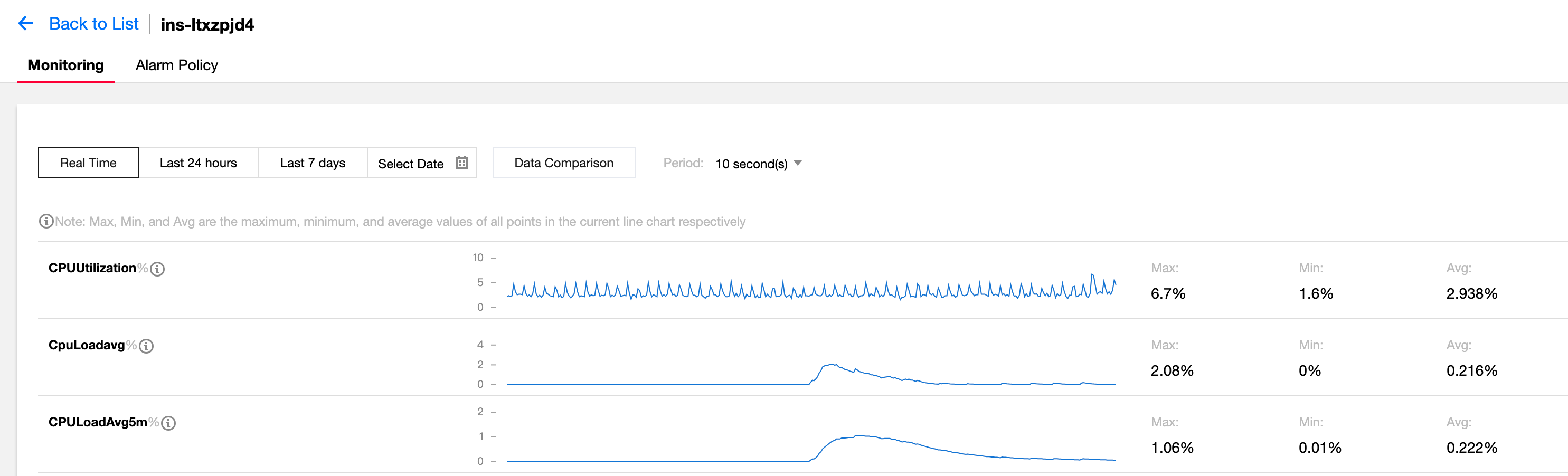
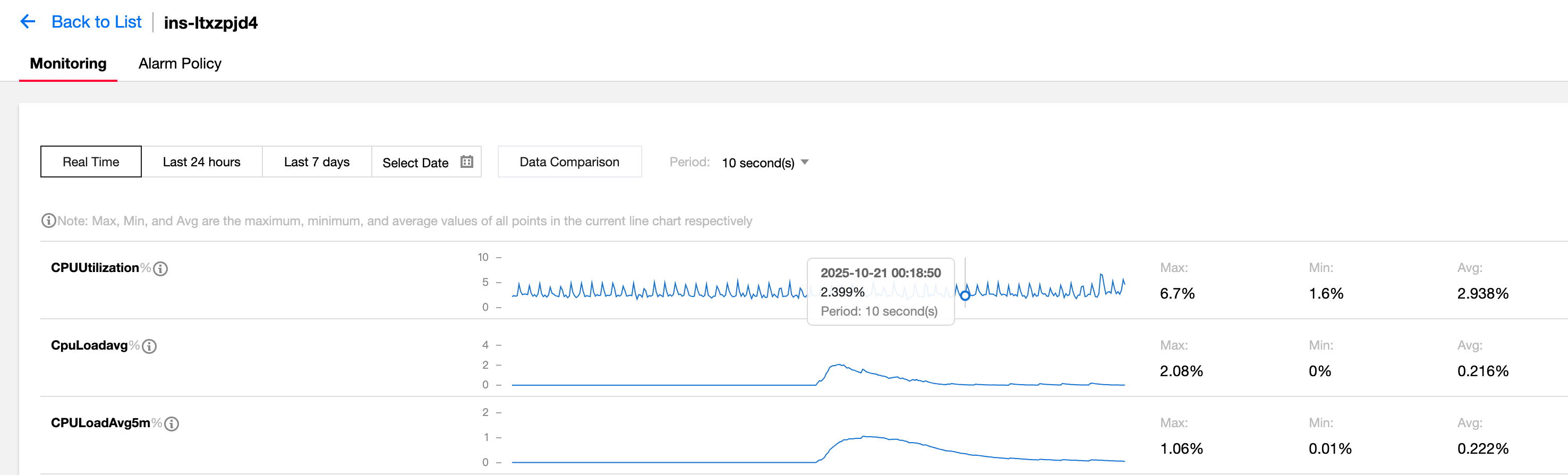
- Reason for abnormal 7-day data:
Aggregation rule of Cloud Monitor. If an aggregation rule is configured, this rule will be used preferentially to aggregate data. Otherwise, the daily data and hourly data are aggregated based on a certain granularity. The 5-minute granularity is prioritized over the 1-minute granularity. - Solution:
Execute the following SQL on the secondary database to delete the daily aggregation method and use the default 5 minutes to calculate the 3600s data. Be sure to back up the database before the operation.
- Symptoms are as follows:
DELETEa from cAssociationMiningRule as a, cDimensionView as b, cDimensionGroup as cwhere a.outputDimGroupId=c.dimGroupId and a.outputPeriod>300 andb.dimensionGroup=c.dimensionGroup and b.namespace=c.namespace and b.namespacein("qcce/nat_gw_bm","qce/bm_lb","qce/cmq","qce/cvm","qce/vpc_region_conn","qce/cmongo","qce/bm_intra_lb","qce/cmqtopic","qce/internal_loadbalance_rs","qce/docker","qce/lb","tnm/vsr_vpnconn","qce/nat_qos_stats","qce/cbs","qce/dcg","qce/cos","qce/pcx","qqce/dc","qce/dcx","qce/lb_total","qce/cdp","qce/cdn","qce/ckafka","qce/bm_pcx","qce/scf","qce/ov_cdn","qce/apigateway","qce/loadbalance","qce/qaap","qce/nat_rs_bm","qce/internal_scf","qce/rlb","qce/cdb","qce/redis","qce/phy_host","qce/bm_rlb","qcce/sqlserver","qce/tdsql","qce/ctsdb","qce/iotmq","qce/csg","qce/vpc_net_detect","qce/ces","qce/emr","pce/bm","pce/cos","pce/netdevice","pce/stgw_lb_ld","pce/lb_ld","pce/cfs_resource","qce/vpc_gateway","qce/vpc_nat","qce/vpc_jnsgw","pce/cdb_privaate","pce/redis","pce/ccb_weblogic");
- No monitoring data for some CVM metrics
- Failure symptoms:
There is no monitoring data on the CPU utilization, memory usage, and memory utilization of the CVM. - Installation flowchart of barad_agent
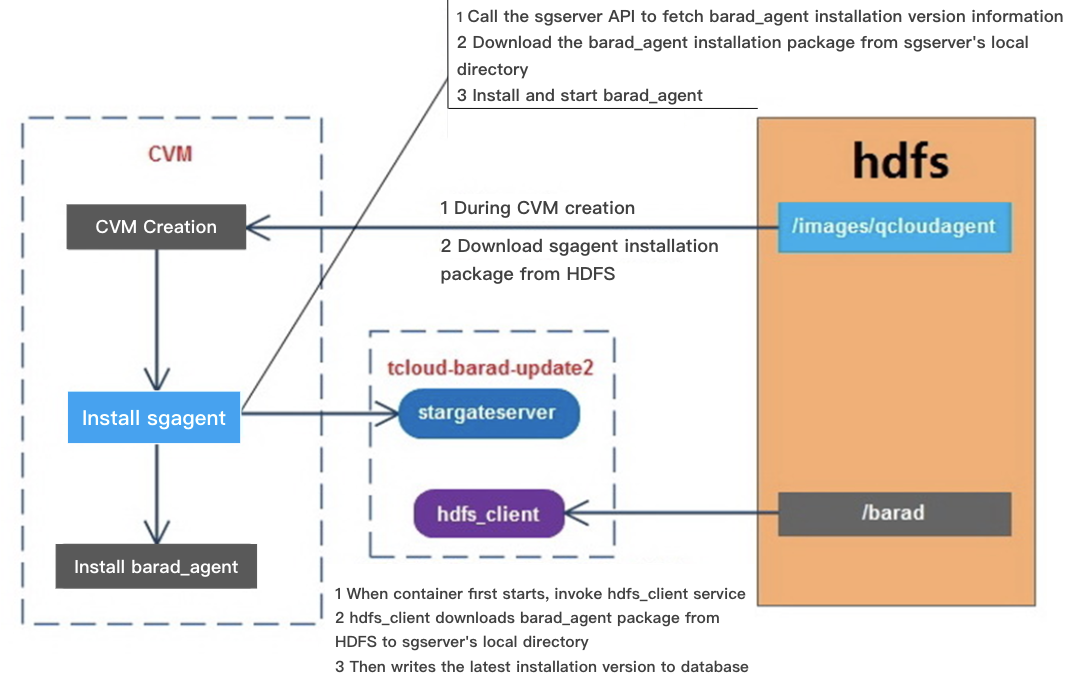
- Installation process of barad_agent
- If the user chooses to enable Cloud Monitor when creating a CVM.
- After the CVM is successfully created, it will download the latest version of the Stargate installation package from the /images/qcloudagent directory of HDFS (generally the stargate_linux_install_v1.2.6.tar.gz version).
- Install and start the sgagent service.
- The container (tcloud-barad-update2) where sgserver is located will execute the hdfs_client service command when it is first started.
- hdfd_client will download the latest barad_agent installation package from the /barad directory of HDFS (generally /barad/baradagent_installer of the cloud platform) to the local /data/www/update2.agent.yun.com/update directory and write the version information to the database.
- After sgagent starts, it will call the sgserver API to query the installed version information of barad_agent.
- Download the barad_agent installation package from the /data/www/update2.agent.yun.com/update directory of sgserver.
- Install and start the barad_agent service.
- In the whole process:
- The barad_agent installation package is provided by the CVM team, which ensures that the latest installation package information is uploaded to the /barad directory of HDFS.
- The barad_agent installation package and configuration are maintained by the CVM team. The sgagent is merely responsible for download, installation, and startup.
- Steps for problem localization in the CVM data reporting process
- First, perform packet capture confirmation on the NWS machine to check whether there is data reporting.
- Capture packets by using the UUID of the CVM as a keyword.
tcpdump-i any -nn -s0 -A 'dst port 80' | grep '8d8bf61d-e938-4f0d-95cc-b455d9f778a1'
Filtering only by the UUID keyword may only capture the reported data from the host, while there is no data reported from the CVM instance. - So it is recommended to add the metric keyword for packet capture: tcpdump -i any-nn -s0 -A 'dst port 80' | grep '8d8bf61d-e938-4f0d-95cc-b455d9f778a1' | grep'"cpu_usage'
- If no data is captured, log in to the instance to continue confirmation.
- Capture packets by using the UUID of the CVM as a keyword.
- Method to log in to the CVM instance
- Query the IP address of the host through the UUID on the operation side.

- Log in to the host.
Enter the jump server in the environment where it is located, for example, M14.
Use the root account for login. Contact technical support personnel for the password.
[m14@cloud64 ~]$ ssh root@10.19.0.21
Log in to the CVM instance via UUID.
virsh console 8d8bf61d-e938-4f0d-95cc-b455d9f778a1
Some CVM instances require an instance account and password to log in. (You can ask the creator of the CVM instance for them.)
- Query the IP address of the host through the UUID on the operation side.
- Failure symptoms:
VM_0_34_centos login: root
Password:
Last failed login: Sun May 24 12:52:59 CST 2020 on ttyAMA0
There were 2 failed login attempts since the last successful login.
Last login: Thu May 21 14:34:53 on ttyAMA0
Welcome to tlinux 2.4 for aarch64
Version 2.4 20191012
tlinux-2.4-kvm-guest-aarch64-20200115
[root@VM_0_34_centos ~]#
- Confirm whether the sgagent has been properly installed.
Check if the sgagent process has started normally.
ps -aux | grep agent

- If the sgagent is not installed, you need to confirm two points.
- Whether a user selects to enable Cloud Monitor when creating a CVM.
- Whether there is an installation package of sgagent in the /images/qcloudagent/ directory in HDFS.
- Method of logging in to HDFS
- Search for the node information on HDFS.
- Enter the tcloud-barad-update2 container.
- View TCE service configuration information vim/tce/conf/cm/local.json.
- Find HDFS-related configurations.
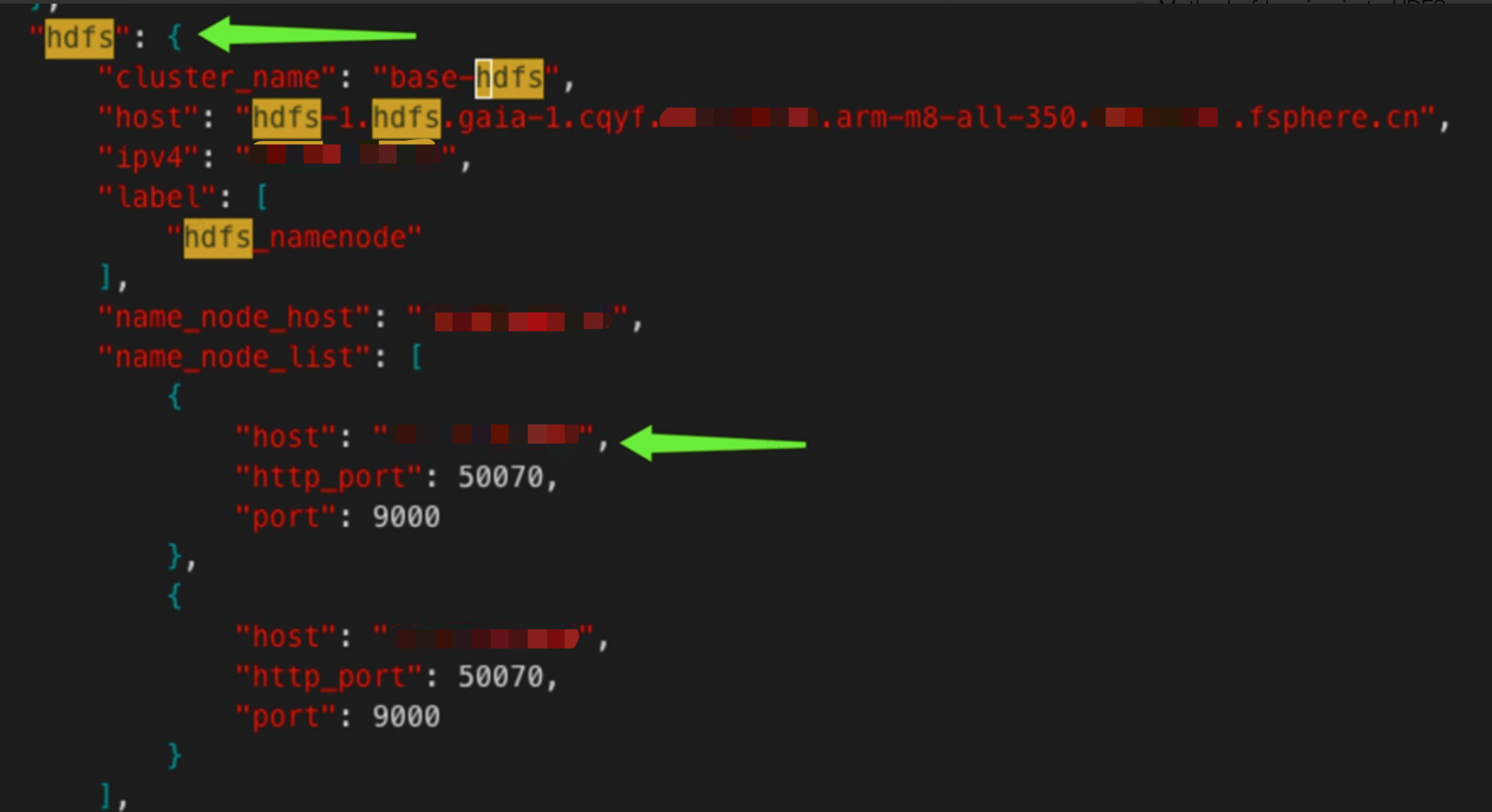
- Log in to HDFS.
Log in to the HDFS server with the root account. Contact technical support personnel for the password.
[m14@cloud64 ~]$ ssh root@10.23.0.133 - View HDFS directory information.
View the sgagent installation package.
hadoop fs -ls/images/qcloudagent
View the barad_agent installation package.
hadoop fs -ls /barad - Upload the sgagent installation package.
If you do not see the /images/qcloudagent/stargate_linux_install_v1.2.6.tar.gz installation package in HDFS,
it may be caused by the installation fault of the production component product-barad-sgagent.If it is an internal environment, such as yf1 or TencentOS, rerun the QCI process and manually install the agent.
If it is a customer environment, reinstallation by the technical personnel is required.
Note:
The product-barad-sgagent production component installation procedure mainly involves two things.
Decompress the original stargate_linux_install installation package, replace the related configuration in the TCE environment, and then repackage it.
Upload the packaged installation package to the /images/qcloudagent/ directory in HDFS.If it is a temporary test, you can consider manually uploading the installation package to HDFS.
hadoop fs -put /tmp/stargate_linux_install_v1.2.6.tar.gz /images/qcloudAfter ensuring that the HDFS has the sgagent installation package, when a user creates a new CVM and selects to enable Cloud Monitor, sgagent will be automatically downloaded and installed.
- Confirm whether the barad_agent is normal.
- Log in to the CVM instance to confirm whether the barad_agent starts normally.
ps -aux | grep agent
- Log in to the CVM instance to confirm whether the barad_agent starts normally.

- If the barad_agent process starts normally but there is still no data reporting, the cause may be environmental issues or barad_agent configuration problems. (Contact CVM and TCE personnel to handle it.)
You can also follow the steps below to check and provide relevant information to CVM and TCE personnel for locating.- Confirm whether the plugin.ini configuration is normal.
cd /usr/local/qcloud/monitor/barad/
[root@VM_0_17_linux barad]# catetc/plugin.ini - View whether dispatcher.log and executor.log output abnormal information.
- Check whether the metadata is reachable.
Whether curl metadata_url/uuid can return data normally, such as curl http://product-cvm-metadata.cityA.yf-1.tcepoc.fsphere.cn:80/meta-data/uuid.
- Confirm whether the plugin.ini configuration is normal.
- If the barad_agent is not started:
- Confirm whether the sgagent exception causes the barad_agent installation fault.
Check whether the URL in /usr/local/qcloud/stargate/etc/base.conf can be accessed normally. Check whether there are exception logs in /usr/local/qcloud/stargate/logs/stargate.log. - If the address http://update2.agent.yun.com/interface.php requested by base.conf is not accessible:
Enter the tcloud-barad-update2 container and confirm whether the sgserver service is running normally. - Confirm whether there is the latest barad_agent installation package under /data/www/update2.agent.yun.com/update in the tcloud-barad-update2 container.
- If there is no latest installation package, the latest package can be downloaded from HDFS through hdfs_client.
cd /usr/local/services/hdfs_client/ && ./hdfs_client -f/barad/baradagent_installer - ehdfs_client update fails.
First, check whether the hdfs_client configuration is correct and the configuration is abnormal. (The cause is environmental issues. Contact our TCE colleagues to handle it.)
It is also possible that there is no barad_agent installation package on HDFS. (Contact our CVM colleagues to handle it.)
- Confirm whether the sgagent exception causes the barad_agent installation fault.
- After confirming that there is the latest barad_agent installation package on sgserver, log in to the CVM instance and restart the sgagent service, and it can be automatically installed and started.