

What is AS?
AS (Auto Scaling) can adjust CVM computing resources automatically based on your business needs and policies, ensuring you have the right amount of CVM instances to handle your application's load. Intelligent scaling is an important part of your Web services' cost control and resource management. When your web applications receive more traffic, you'll add more servers to handle the extra load. Similarly, you'll terminate underutilized servers when traffic to your web applications decreases.
Using AS for capacity adjustment only requires setting expansion and contraction conditions in advance. AS automatically increases the number of servers used to maintain performance when conditions are met; when demand decreases, AS reduces the number of servers based on your contraction conditions, helping you minimize costs to the greatest extent.
As shown in the comparison below, by using AS, your cluster can always maintain just the right amount of resources and stay in a healthy state. You will say goodbye to many frustrations encountered with traditional modes:
- A sudden increase in business or a CC attack causes a lack of machines, making your service unresponsive.
- The estimation of resources is based on peak traffic. As the actual traffic rarely reaches the peak, wasted resources are caused.
- Manual monitoring and frequent handling of capacity alerts lead to multiple manual changes.
Cluster Maintenance in the Traditional Mode: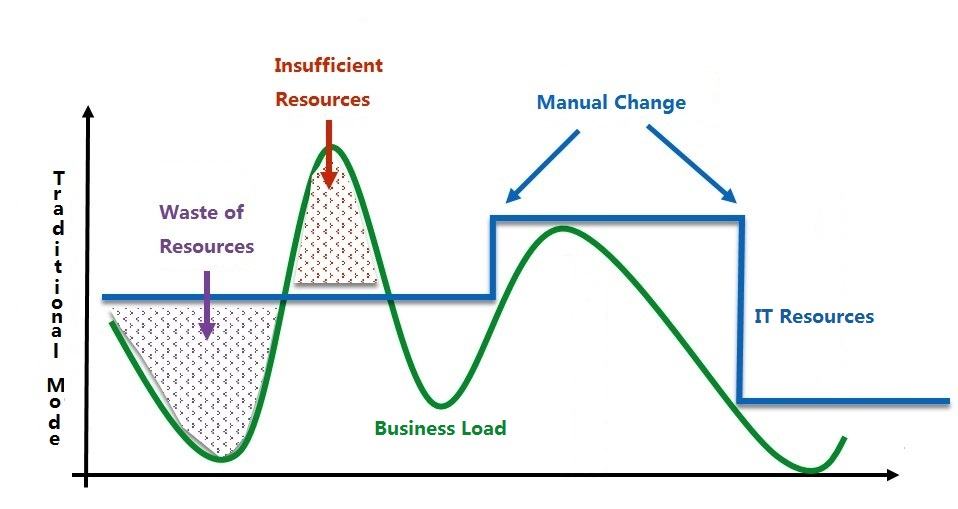
The Effect After Adopting AS: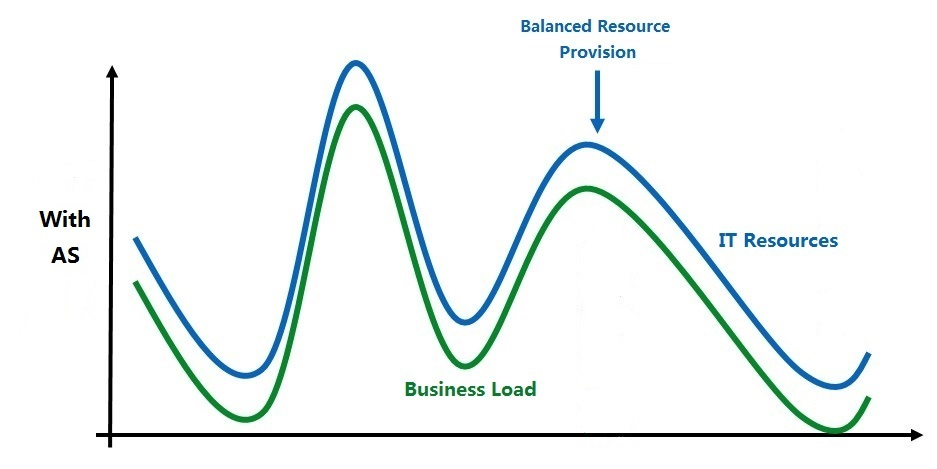
How AS Works?
In common Web application services, your cluster usually runs multiple copies of an application to meet client traffic, for example, the frontend server cluster at the access layer, the application server cluster at the logical layer, and the backend cache server cluster. Every instance can process client requests.
These instances are similar or identical, and the quantity is usually adjustable. You can add them to one scaling group for joint management:
- You can specify the minimum number of instances in each scaling group, and AS ensures the number of instances in the group never falls below this number;
- You can specify the maximum number of instances in each scaling group, and AS ensures the number of instances in the group never exceeds this number;
- You can specify a scaling policy, and AS launches or terminates instances when the application's demand increases or decreases. There are two types of scaling policies:
- Alarm-Triggered Scaling Policy: Dynamically scale according to specified conditions (for example, scale out when the CPU usage of the machines in the scaling group exceeds 60%.).
- Scheduled Scaling Policy: Scale in or out at specified times (for example, scale out every night at 21:00.).
- After the policy is set, you can also set the scaling activity notifications. AS informs you via Email, SMS, and message center when scaling activities occur. You don't need to monitor your business request volume constantly. Just pay attention to the notifications from AS.
- You can also specify the number of machines required at any time or add existing machines to the scaling group for joint management.
Basic Concepts of AS
The AS product has the following basic concepts:
- Scaling Group:
A scaling group contains a collection of CVM instances that follow the same rules and have a shared purpose. Scaling groups define attributes such as the maximum and minimum numbers of CVM instances in the group and their associated CLB instances. - Launch Configuration:
A launch configuration is the template for the automatic creation of CVMs. It contains the image ID, CVM instance type, system disk/data disk types and capacities, key pair, security group, etc.
When a scaling group is created, it must be specified, and the properties of the launch configuration cannot be edited. - Scaling Policy:
The conditions for executing scaling actions. The trigger can be a specific time or an alarm from the cloud monitor, with actions including removing or adding CVMs.
There are two types of scaling policies: - Scheduled Scaling Policy:
The automatic addition and removal of CVM instances at a specified time point can be performed on a periodic basis. - Alarm-Triggered Scaling Policy:
The automatic addition and removal of CVM instances based on the cloud monitor metrics such as CPU, memory, and network traffic. - Cooldown Period:
Cooldown period refers to a locking duration after one scaling activity (addition or removal of CVM instances) is executed within the same scaling group. During this duration, no scaling activities are performed by the scaling group. The cooldown period can be specified from 0 to 999,999 (seconds).