

Overview
Security groups are the virtual firewalls of Cloud Virtual Machine instances, and each Cloud Virtual Machine instance must belong to at least one security group. When you create a Cloud Virtual Machine instance, if you have not created a security group yet, the cloud platform provides two templates: Open All Ports and Open Ports 22, 80, 443, 3389 and ICMP Protocol to create a default security group.
If you do not want Cloud Virtual Machine instances to be added to the default security group, you can also create your own security groups as described in this document. This document introduces to create a security group on the Cloud Virtual Machine console.
Directions
- Log in to the Cloud Virtual Machine Console.
- In the left sidebar, click Security Group to enter the Security Group Management page.
- On the Security Group Management page, select Region and click +Create.
- In the Create Security Group pop-up window, complete the parameter configuration. See the figure below:
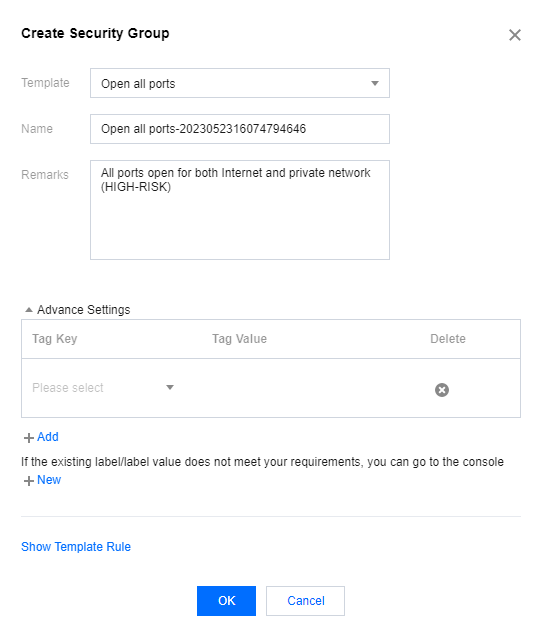
- Template: based on the services to be deployed for the Cloud Virtual Machine instances in the security group, select an appropriate template to simplify security group rule configuration. As shown below:
| Template | Description | Scene |
|---|---|---|
| Open All Ports | All ports are opened to the public network and private network by default, which has certain security risks. | - |
| Open Ports 22, 80, 443 and 3389 and ICMP Protocol. | By default, ports 22, 80, 443, 3389 and the ICMP protocol are opened. The private network is fully opened. | Instances in the security group need to be deployed with Web services. |
| Custom | After the security group is successfully created, add the security group rules as required. | - |
- Name: customize the security group name.
- Remarks: Custom, and a short description of the security group for easier management.
- Advance Settings: Set tag information. If there is no tag, you can click Create to create tag information; click Add to add a tag, and click Delete to delete it.
- Click OK to complete the creation of the security group.
If you selected the Custom template when creating a new security group, you can click Set Rules Now to Add Security Group Rules.