

Overview
When some of the cloud servers in the Converge Cloud VPC do not have a regular public IP but need to access the Internet, you can use a cloud server with a public IP (either a regular public IP or an elastic public IP) to access the Internet. The public gateway cloud server will perform source address translation for outbound traffic. After the traffic from all other cloud servers passes through the public gateway cloud server to access the Internet, the source IP is converted to the public IP address of the public gateway cloud server, as shown in the diagram below:
Prerequisites
- Logged in to the Cloud Server Console.
- The public gateway cloud server can only forward routing requests for subnets other than its own. Therefore, the public gateway cloud server cannot be in the same subnet as the cloud servers that need to use the public gateway to access the Internet.
- The public gateway cloud server must be a Linux cloud server; Windows cloud servers cannot be used as a public gateway.
Directions
Step 1: bind an EIP (optional)
Note:
If the cloud server used as a public gateway already has a public IP address, skip this step and proceed with the subsequent steps.
- In the left sidebar, click EIP to enter the elastic public IP management page.
- In the operation column of the EIP that needs to be bind to an instance, select More > Bind.

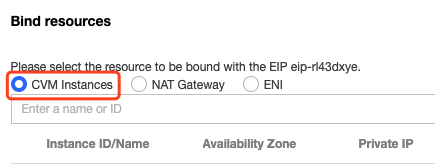
- In the "Bind Resource" pop-up box, select a CVM instance chosen as the public gateway to bind.
Step 2: configure the subnet route table where the gateway resides
The gateway subnet and the regular subnet cannot share the same route table. You need to create a new, separate gateway route table and associate the gateway subnet with this route table.
- Create a custom route table.
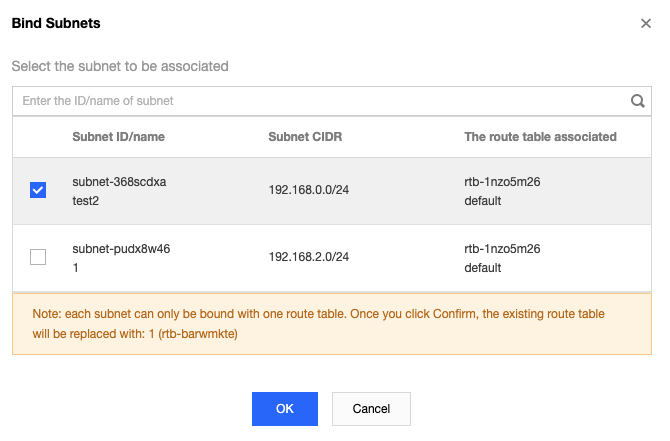
- After creation, you will be prompted to associate the subnet. Directly associate the subnet where the public gateway server is located.
Step 3: configure the route table for the regular subnet
Configure the route table for the regular subnet to route default traffic through the public gateway cloud server, allowing cloud servers in the regular subnet to access the Internet via the routing and forwarding capability of the public gateway.
In the route table of the subnet where the regular cloud server is located, add the following routing policy:
- Destination: the public address you want to access.
- Next hop type: CVM.
- Next hop: the private network IP of the cloud server instance with the EIP bind in step 1.
For detailed operations, please refer to Configure Route Policy.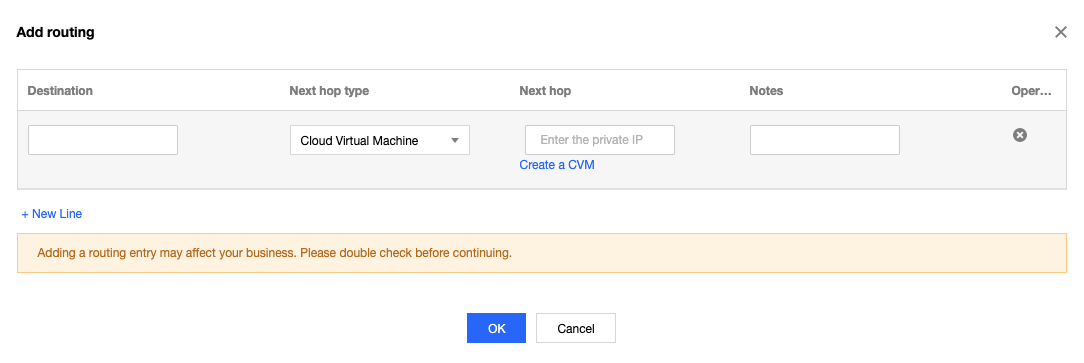
Step 4: configure the public gateway
- Log in to the public gateway cloud server, enable network forwarding, NAT proxy functionality, and related parameter optimizations.
- Execute the following command to create a script named
vpcGateway.shin the/usr/local/sbindirectory.
vim /usr/local/sbin/vpcGateway.sh
Press "i" to switch to edit mode and write the following code into the script.
# !/bin/bash
echo "----------------------------------------------------"
echo " `date`"
echo "(1)ip_forward config......"
file="/etc/sysctl.conf"
grep -i "^net\.ipv4\.ip_forward.*" $file &>/dev/null && sed -i \
's/net\.ipv4\.ip_forward.*/net\.ipv4\.ip_forward = 1/' $file || \
echo "net.ipv4.ip_forward = 1" >> $file
echo 1 >/proc/sys/net/ipv4/ip_forward
[ `cat /proc/sys/net/ipv4/ip_forward` -eq 1 ] && echo "-->ip_forward:Success" || \
echo "-->ip_forward:Fail"
echo "(2)Iptables set......"
iptables -t nat -A POSTROUTING -j MASQUERADE && echo "-->nat:Success" || echo "-->nat:Fail"
iptables -t mangle -A POSTROUTING -p tcp -j TCPOPTSTRIP --strip-options timestamp && \
echo "-->mangle:Success" || echo "-->mangle:Fail"
echo "(3)nf_conntrack config......"
echo 262144 > /sys/module/nf_conntrack/parameters/hashsize
[ `cat /sys/module/nf_conntrack/parameters/hashsize` -eq 262144 ] && \
echo "-->hashsize:Success" || echo "-->hashsize:Fail"
echo 1048576 > /proc/sys/net/netfilter/nf_conntrack_max
[ `cat /proc/sys/net/netfilter/nf_conntrack_max` -eq 1048576 ] && \
echo "-->nf_conntrack_max:Success" || echo "-->nf_conntrack_max:Fail"
echo 10800 >/proc/sys/net/netfilter/nf_conntrack_tcp_timeout_established \
[ `cat /proc/sys/net/netfilter/nf_conntrack_tcp_timeout_established` -eq 10800 ] \
&& echo "-->nf_conntrack_tcp_timeout_established:Success" || \
echo "-->nf_conntrack_tcp_timeout_established:Fail"
Press "Esc", enter ":wq" to save the file and return.
Execute the following command to set the script file permissions.
chmod +x /usr/local/sbin/vpcGateway.sh
echo "/usr/local/sbin/vpcGateway.sh >/tmp/vpcGateway.log 2>&1" >> /etc/rc.local
Set the rps for the public gateway:
Execute the following command to create a script named
set_rps.shin the/usr/local/sbindirectory.
vim /usr/local/sbin/set_rps.sh
Press "i" to switch to edit mode and write the following code into the script.
# !/bin/bash
echo "--------------------------------------------"
date
mask=0
i=0
total_nic_queues=0
get_all_mask() {
local cpu_nums=$1
if [ $cpu_nums -gt 32 ]; then
mask_tail=""
mask_low32="ffffffff"
idx=$((cpu_nums / 32))
cpu_reset=$((cpu_nums - idx * 32))
if [ $cpu_reset -eq 0 ]; then
mask=$mask_low32
for ((i = 2; i <= idx; i++)); do
mask="$mask,$mask_low32"
done
else
for ((i = 1; i <= idx; i++)); do
mask_tail="$mask_tail,$mask_low32"
done
mask_head_num=$((2 ** cpu_reset - 1))
mask=$(printf "%x%s" $mask_head_num $mask_tail)
fi
else
mask_num=$((2 ** cpu_nums - 1))
mask=$(printf "%x" $mask_num)
fi
echo $mask
}
set_rps() {
if ! command -v ethtool &>/dev/null; then
source /etc/profile
fi
ethtool=$(which ethtool)
cpu_nums=$(cat /proc/cpuinfo | grep processor | wc -l)
if [ $cpu_nums -eq 0 ]; then
exit 0
fi
mask=$(get_all_mask $cpu_nums)
echo "cpu number:$cpu_nums mask:0x$mask"
ethSet=$(ls -d /sys/class/net/eth*)
for entry in $ethSet; do
eth=$(basename $entry)
nic_queues=$(ls -l /sys/class/net/$eth/queues/ | grep rx- | wc -l)
if (($nic_queues == 0)); then
continue
fi
cat /proc/interrupts | grep "LiquidIO.*rxtx" &>/dev/null
if [ $? -ne 0 ]; then # not smartnic
#multi queue don't set rps
max_combined=$(
$ethtool -l $eth 2>/dev/null | grep -i "combined" | head -n 1 | awk '{print $2}'
)
#if ethtool -l $eth goes wrong.
[[ ! "$max_combined" =~ ^[0-9]+$ ]] && max_combined=1
if [ ${max_combined} -ge ${cpu_nums} ]; then
echo "$eth has equally nic queue as cpu, don't set rps for it..."
continue
fi
else
echo "$eth is smartnic, set rps for it..."
fi
echo "eth:$eth queues:$nic_queues"
total_nic_queues=$(($total_nic_queues + $nic_queues))
i=0
while (($i < $nic_queues)); do
echo $mask >/sys/class/net/$eth/queues/rx-$i/rps_cpus
echo 4096 >/sys/class/net/$eth/queues/rx-$i/rps_flow_cnt
i=$(($i + 1))
done
done
flow_entries=$((total_nic_queues * 4096))
echo "total_nic_queues:$total_nic_queues flow_entries:$flow_entries"
echo $flow_entries >/proc/sys/net/core/rps_sock_flow_entries
}
set_rps
Press "Esc", enter ":wq" to save the file and return.
Execute the following command to set the script file permissions.
chmod +x /usr/local/sbin/set_rps.sh
echo "/usr/local/sbin/set_rps.sh >/tmp/setRps.log 2>&1" >> /etc/rc.local
chmod +x /etc/rc.d/rc.local
- After completing the above configuration, restart the public gateway cloud server to make the configuration effective. Then, test whether the cloud servers without public IPs can successfully access the Internet.