

This document describes how to perform rule protection settings through WAF to protect against web attacks.
Background Information
WAF uses a rule protection engine based on regular expressions and an AI protection engine based on machine learning to protect against web vulnerabilities and unknown threats.
The WAF rule protection engine provides expert rule sets based on accumulated web threat intelligence to prevent OWASP top 10 attacks. Currently, it can defend against 12 categories of common web attacks, such as SQL injections, XSS attacks, malicious scans, command injection attacks, web application vulnerabilities, WebShell uploads, non-compliant protocols, Trojans, and backdoors.
The WAF rule protection engine supports rule level configuration. You can configure the rule protection level according to your actual business needs, and enable or disable rule sets, individual rules, and preset rules. You can also use the allowlist of specified URLs and rule IDs to process false positives.
Operation Steps
Settings of Domain Name Rule Protection Engine
- Log in to the WAF console. In the left sidebar, select Configuration Center > Basic Security > WEB Security.
- Configure the protection mode, protection level, and malicious file detection method of basic web protection on the Protection Settings page. You can also enable the anti-scanning feature and set IP address blocking rules.
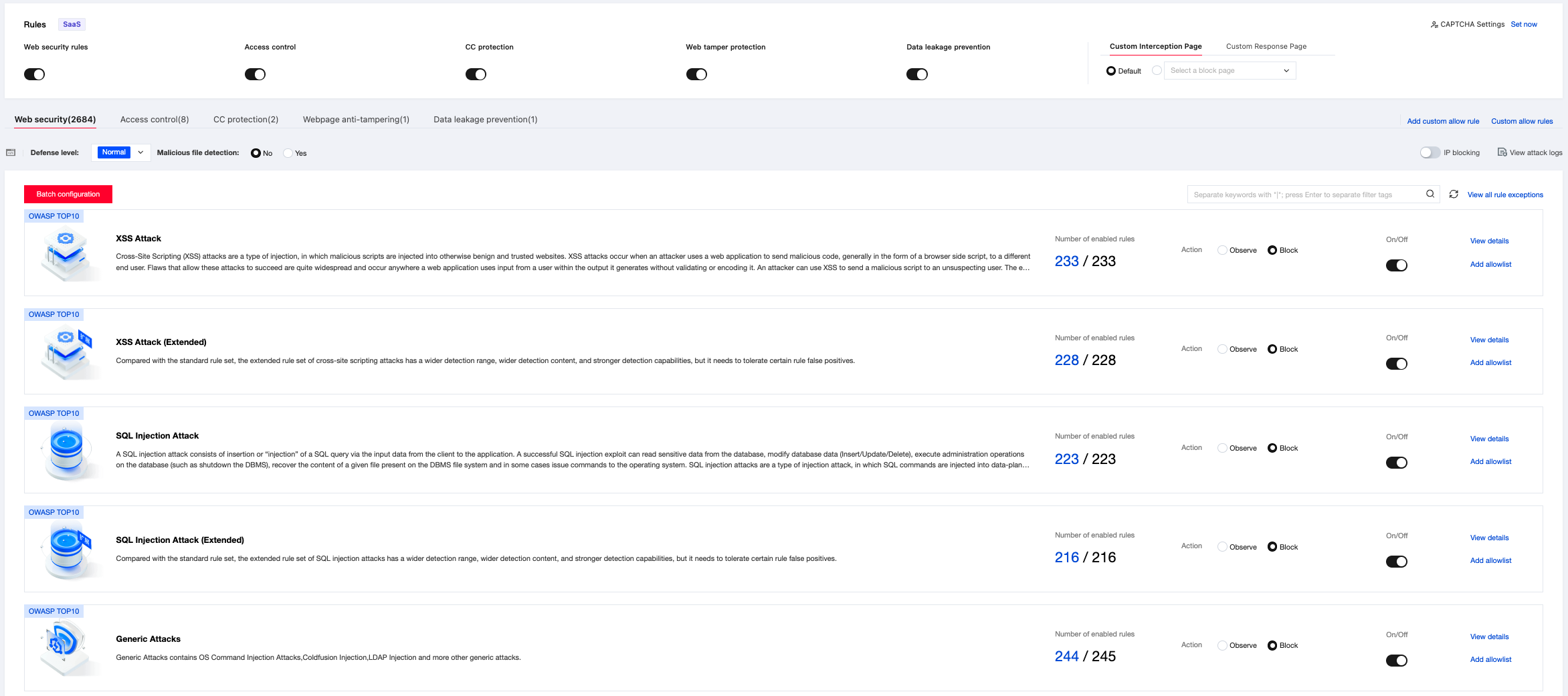
Field description:
- Rule engine switch: Enabled, by default. When the switch is disabled, domain name requests transiting through the WAF will not undergo rule engine threat processing.
- Protection mode: Rule engine working mode, which is interception by default.
Observation: Does not block attack requests; makes predictions and produces observation logs.
Interception: Directly blocks web attack requests and produces interception logs. - Protection level: Rule engine protection level, which is normal by default.
- Normal: detects common web application attacks. If you notice excessive false interceptions at the default level, or if your workload involves significant uncontrolled user input (such as websites with rich text editors), it is recommended that you select this mode.
- Strict: strictly detects web application attacks such as SQL injections, XSS attacks, and command execution. It is the default mode.
- Rule management: Through rule management, users can view rule engine information and set the rule engine, including viewing attack classifications, viewing rule content included in rule levels and rule set update dynamics, enabling or disabling single rules, and adding rules to the allowlist based on domain name URLs and rule IDs.
- Supported decoding types: The current rule engine supports the following decoding types by default, with manual settings not supported.
URL decoding (multiple decoding), javascript Unicode decoding, comment processing, space compression, UTF-7 decoding, HTML entity decoding, Multipart parsing, JSON parsing, XML parsing, and Form parsing.
Viewing rule classifications
Enter the Rule Engine Settings page.
- Method 1: Log in to the WAF console. In the left sidebar, choose Asset Center > Access Management to enter the Domain Name List Management page. Select any domain name, and click the Protection Configuration button in the operation column to enter the Web Security Protection Configuration page of the domain name and view rule details.
- Method 2:
a. Log in to the WAF console. In the left sidebar, choose Configuration Center > Basic Security.
b. In the domain name list, click the domain name to be protected to enter the Web Security settings page and open the Rule Engine page.
Enter the Rule Base Management page.
Log in to the WAF console. In the left sidebar, choose Service Management > Web Rule Base. You can view the attack classification descriptions and rule update dynamic information supported by the current WAF for protection.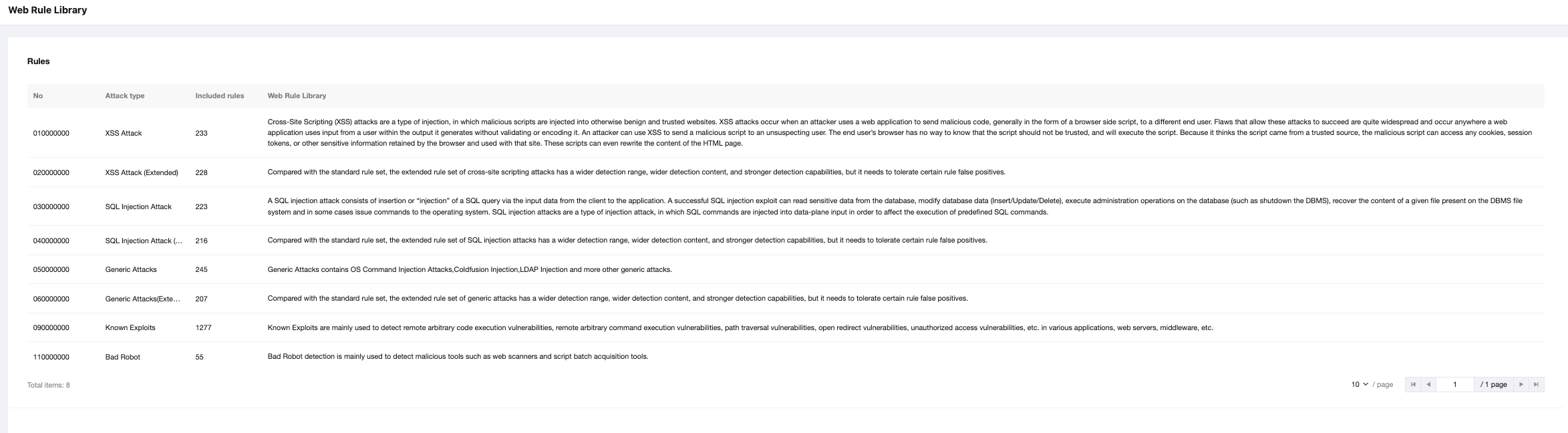
The attack classifications supported by the current WAF for protection are as follows:
| Attack Classification | Attack Description |
|---|---|
| XSS attack | The cross-site scripting (XSS) attack is a type of injection where malicious scripts are injected into other trusted websites. XSS attacks occur when an attacker uses a web application to send malicious code (usually in the form of browser-side scripts) to different end users. The defects that allow these attacks to succeed are very common and occur whenever a web application uses input from a user in its generated output without verifying or encoding it. Attackers can use XSS to send malicious scripts to unsuspecting users. The end user's browser is unable to know that the script should not be trusted and will execute the script. Since it considers the script to come from a trustworthy source, the malicious script can access any cookies, session tokens, or other sensitive information reserved by the browser and used with that site. These scripts can even rewrite the contents of HTML pages. |
| XSS attack (extended) | The extended rule set of XSS attacks has a broader detection range, wider detection content, and stronger detection capability compared with the standard rule set, but it needs to tolerate certain rule false positives. |
| SQL injection attack | SQL injection attacks include inserting or "injecting" SQL queries through input data from the client to the application. A successful SQL injection vulnerability can read sensitive data from the database, modify (insert/update/delete) database data, perform management operations on the database (such as shutting down the DBMS), recover the content of a given file existing in the DBMS file, and issue a command to the operating system in some cases. The SQL injection attack is a type of injection attack where SQL commands are injected into data plane inputs to impact the execution of predefined SQL commands. |
| SQL injection attack (extended) | The extended rule set of SQL injection attacks has a broader detection range, wider detection content, and stronger detection capability compared with the standard rule set, but it needs to tolerate certain rule false positives. |
| General attack | General attacks include operating system command injection attacks, Coldfusion injections, LDAP Injections, and other general attacks. |
| General attack (extended) | The extended rule set of general attacks has a broader detection range, wider detection content, and stronger detection capability compared with the standard rule set, but it needs to tolerate certain rule false positives. |
| Known weakness | Known weaknesses are primarily used to detect remote arbitrary code execution vulnerabilities, remote arbitrary command execution vulnerabilities, path traversal vulnerabilities, open redirection vulnerabilities, and unauthorized access vulnerabilities that occur in various applications, web servers, and middleware. |
| Bad bot | Bad bot detection is primarily used to detect malicious tools such as web scanners and script batch obtaining tools. |
Rule management
- Log in to the WAF console. In the left sidebar, choose Configuration Center > Basic Security. After selecting the domain name to be managed, enter the WEB Security page.
- On the WEB Security Management page, you can enable or disable the rules, perform observation mode management, and add the rules to the allowlist.
The interception mode is enabled for all rules by default.

- Users can search for rule sets according to Rule Level, Attack Classification, and CVEID, or by entering Rule ID, and view specific rules and perform operations.
The strict rule level includes normal and strict rules.