

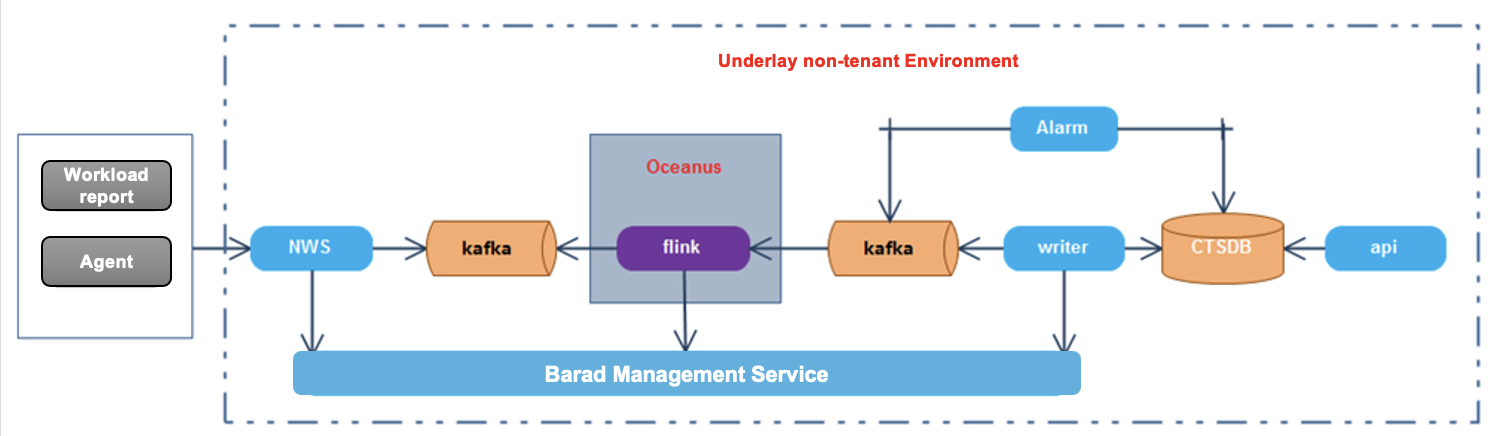
Main module division:
| Module | Description |
|---|---|
| Reporting part | The collection and reporting are mainly completed by the workload reporting module, dcos, as well as the Agents deployed on the instances and the host. Both the instances and the host have access paths to the Cloud Monitor access server. All reports are sent to the unified domain name and CGI provided by the Cloud Monitor. The HTTP protocol is used for reporting. |
| Data processing | Message buffering is provided by the stream processing cluster built by Flink, front access server-NWS, and Kafka. |
| Data storage | CTSDB is used for storage and is maintained and upgraded by a specialized team. |
| Exception handling module | Includes an alarm center and an event center, which respectively handle alarms with thresholds and durations after statistical calculations, as well as simple triggering alarms. |
| Message sending module | Primarily responsible for integrating with the backend platform message sending platform, recording alarm streams, and translating some required fields in alarm displays. |
| Custom message module | A module that provides the tenant side with the feature of directly sending messages. It does not perform convergence processing. |
| Api | It is divided into two layers: customapi and baradapi; the former directly connects to Cloud API Gateway and can be called by the tenant side; the latter directly connects to storage, blocks all storage-related features from the frontend, and provides some metric configuration management features. |
| Self-service access system | It is used on the operation side. It allows Ops personnel to dynamically add and delete dimension aggregation and statistical configurations of metrics. These configurations will affect the metric features for viewing and configuring alarms on the tenant side and the operation side. |
| Other bypass systems | Provides some configuration synchronization features. More supplementary information will be given in the section about the module's detailed architecture later. |
Access layer NWS service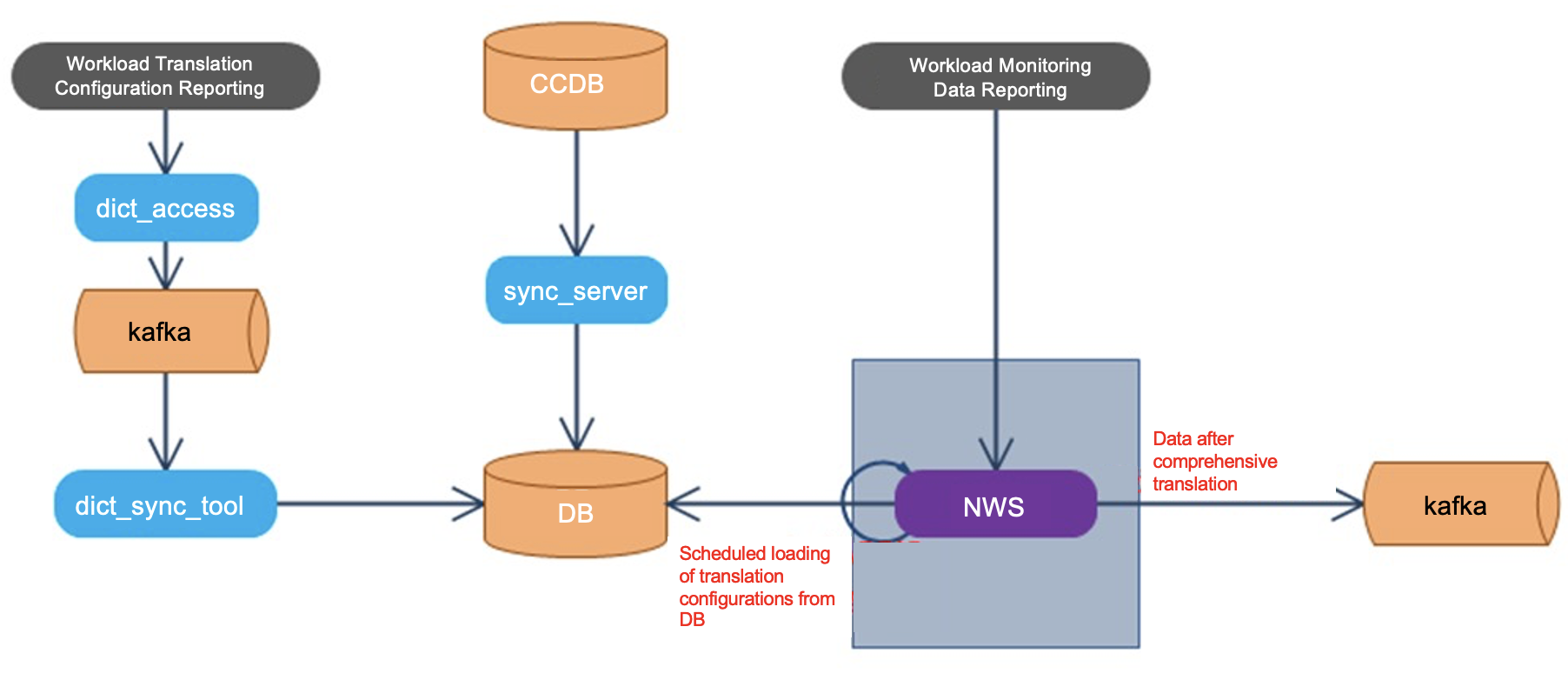
barad_Agent installation process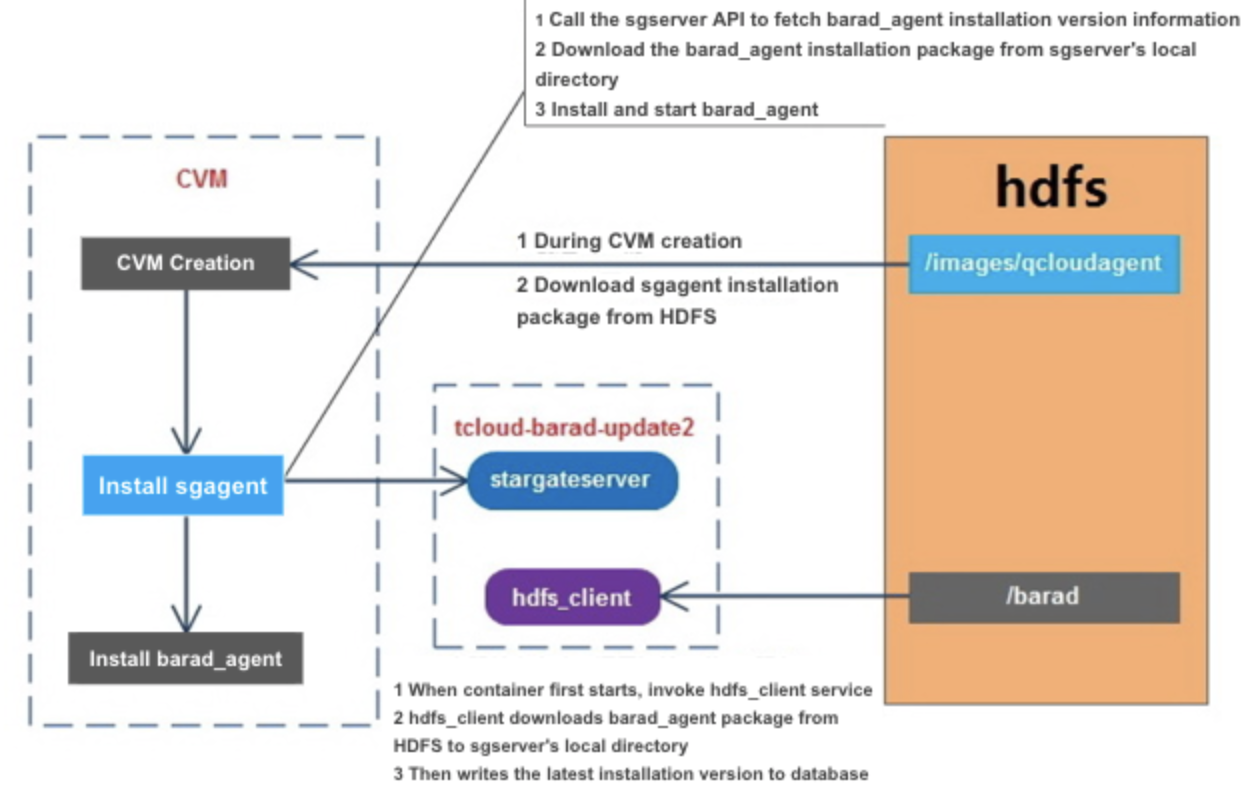
- If the user chooses to enable Cloud Monitor when creating a CVM.
- After the CVM is successfully created, it will download the latest version of the Stargate installation package from the /images/qcloudagent directory of HDFS (generally the stargate_linux_install_v1.2.6.tar.gz version).
- Install and start the sgagent service.
- The container (tcloud-barad-update2) where sgserver is located will execute the hdfs_client service command when it is first started.
- The hdfd_client will download the latest version of the barad_agent installation package from the /barad directory of HDFS (generally /barad/baradagent_installer), place it in the local /data/www/update2.agent.yun.com/update directory, and write the version information to the database.
- After sgagent starts, it will call the sgserver API to query the installed version information of barad_agent.
- Download the barad_agent installation package from the /data/www/update2.agent.yun.com/update directory of sgserver.
- Install and start the barad_agent service.
- In the whole process:
- The barad_agent installation package is provided by the CVM team, which ensures that the latest installation package information is uploaded to the /barad directory of HDFS.
- The barad_agent installation package and configuration are maintained by the CVM team. sgagent is merely responsible for download, installation, and start.