

Overview
VPCDNS supports forwarding the DNS request for a domain name to a designated DNS server for resolution. After a new forwarding rule is created, when a client initiates a DNS request for that domain name:
- VPCDNS first determines whether a resolution record is configured. If yes, VPCDNS intercepts the request for resolution; if not, VPCDNS determines whether a forwarding rule is configured.
- If a forwarding rule is configured, the forwarded DNS performs the resolution; if no forwarding rule is configured and subdomain recursion is enabled, the default recursive resolution is used; otherwise, the request is discarded.
Prerequisites
A private domain name has been created.
Directions
Creating a Forwarding Rule
Log in to the VPCDNS console and go to the Forwarding List management page.
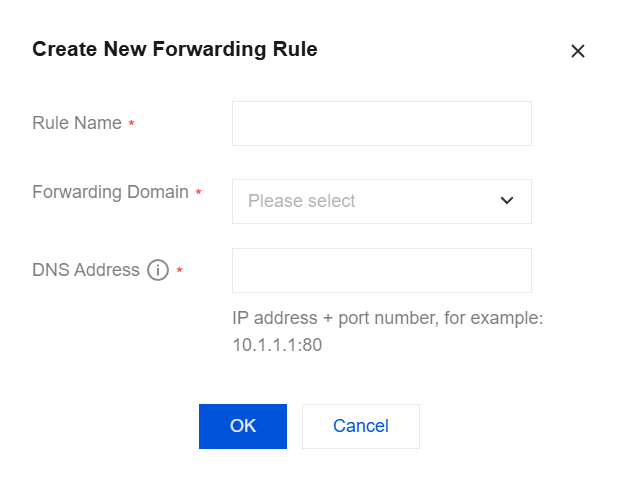
Click Create New Forwarding Rule, and configure the rule name, forwarding domain name, and corresponding DNS address in the dialog box.
Note:
Up to five DNS addresses can be configured.
Click OK. The forwarding rule is created.
Modifying a Forwarding Rule
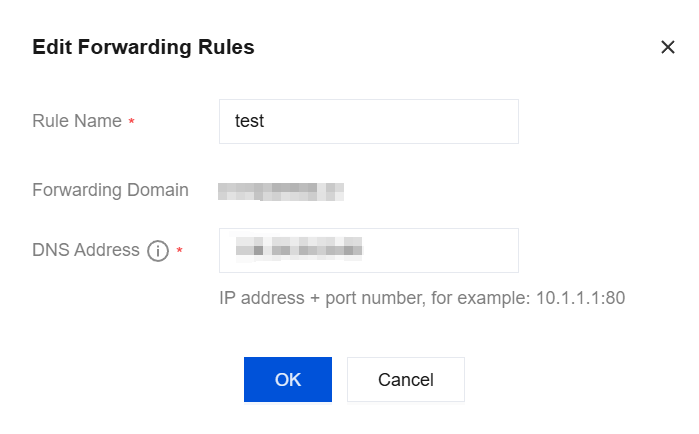
- On the Forwarding List management page, click Modify in the Operation column.
- Modify the rule name and corresponding DNS address.
Deleting a Forwarding Rule
- On the Forwarding List management page, click Delete in the Operation column.
- Click OK in the pop-up dialog box. The forwarding rule is deleted.