

Operation Scenarios
Adding an AAAA record can point a domain to an IPv6 address. This document describes how to add an AAAA record.
Prerequisites
The corresponding private domain has been created. For details, see Creating Forward DNS Resolution for Private Domain.
Directions
- Log in to the VPCDNS console and enter the VPCDNS List management page.
- In the VPCDNS List section, click the name of the private domain for which you need to create an AAAA record.
- Enter the Resolution Record Management Page, click Add Record, and in the pop-up "Add DNS Record" window, fill in the relevant record value information.
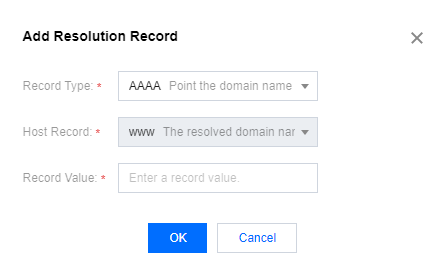
- Record Type: Select AAAA.
- Host Record: Enter the subdomain.
- Record Value: Enter the IP address, you can only enter an IPv6 address.
- Click Save to complete the addition.
