

Operation Scenarios
SPF records are used to specify the servers that send emails and represent an efficient anti-spam solution. This document describes how to add an SPF record.
Prerequisites
The corresponding private domain has been created. For details, see Creating Forward DNS Resolution for Private Domain.
Directions
- Log in to the VPCDNS console and enter the VPCDNS List management page.
- In the "VPC Domain Resolution List", click the private domain name for which you need to create an SPF record.
- Enter the Resolution Record Management Page, click Add Record, and in the pop-up "Add DNS Record" window, fill in the relevant record value information.
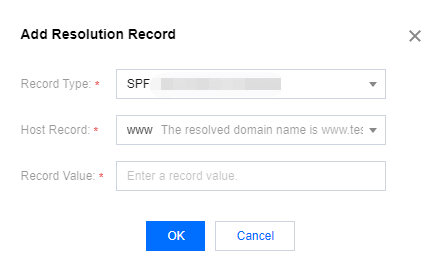
- Record Type: Select SPF.
- Host Record: Enter the subdomain.
- Record Value: For example,
v=spf1 include:spf.mail.test.com ~all, which indicates that only the IP addresses in A and MX records of the domain name are authorized to send emails using this domain name.
- Click Save to complete the addition.
