

Operation Scenarios
SRV records are used to identify a server that is using a specific service, which is commonly found in the Microsoft system's directory management. This document describes how to add an SRV record.
Prerequisites
The corresponding private domain has been created. For details, see Creating Forward DNS Resolution for Private Domain.
Directions
- Log in to the VPCDNS console and enter the VPCDNS List management page.
- In the VPCDNS List section, click the name of the private domain for which you need to create an SRV record.
- Go to the Resolution Record Management page and click Add Record. In the pop-up Add Resolution Record window, fill in the relevant record value information, as shown below:
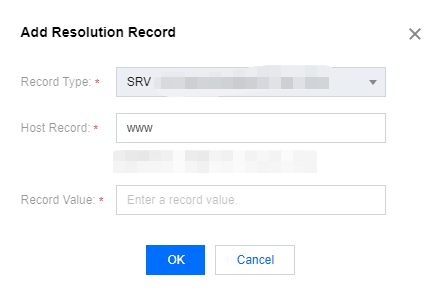
- Record Type: Select SRV.
- Host Record: The service's name. The type of protocol.
- Record Value: Priority, weight, port, and hostname.
- Click Save to complete the addition.
