

Operation Scenarios
You can add an A record to point a domain to an IP address (private network address). This document describes how to add an A record.
Prerequisites
The corresponding private domain has been created. For details, see Creating Forward DNS Resolution for Private Domain.
Directions
- Log in to the VPCDNS console and enter the VPCDNS List management page.
- In the VPCDNS List section, click the name of the private domain for which you need to create an A record.
- Enter the Resolution Record Management Page, click Add Record, and in the pop-up "Add DNS Record" window, fill in the relevant record value information.
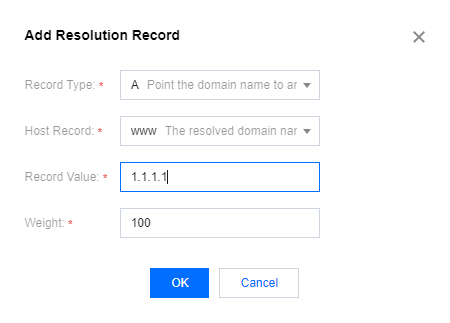
- Record Type: Select A.
- Host Record: Select a subdomain.
- Record Value: Enter the server's private network address.
- Weight: The weight value is set to an integer within the range of 1–100, with the default value being 100.
- Click Save to complete the addition.
