

Common Certificate Application Process
- Generate a private key locally: openssl genrsa -out privateKey.pem 2048, where privateKey.pem is your private key file, and keep it properly.
- Generate a certificate request file: openssl req -new -key privateKey.pem -out server.csr, where server.csr is your certificate request file, which can be used to apply for a certificate.
- Get the content in the request file and go to the CA or other institution sites to apply for a certificate.
Certificate Format Description
Certificate Format Requirements
- The certificate that the user needs to apply for is: a certificate in PEM format under Linux environment. CLB does not support certificates in other formats. For certificates in other formats, see the Instructions on Converting Certificate Format to PEM below.
- If the certificate is issued by a root CA agency, the certificate you get is the only one and no additional certificates are required. The configured site can be considered trustworthy by browsers and other access devices.
- If the certificate is issued by an intermediate CA agency, the certificate file you get contains multiple certificates, and you need to manually merge the server certificate and the intermediate certificate and upload them together.
- If your certificate has a certificate chain, convert the certificate chain content into PEM format and upload it together with the certificate content.
- The splicing rule is: put the server certificate in the first copy, and the intermediate certificate in the second copy, with no blank lines in between.
Usually, when an organization issues a certificate, corresponding instructions will be provided. Please make sure to review them.
Certificate format and certificate chain format examples
The following are examples of the certificate format and certificate chain format. Confirm that the format is correct before uploading:
- Certificate issued by the root CA agency: The certificate format is PEM format in the Linux environment. For example:
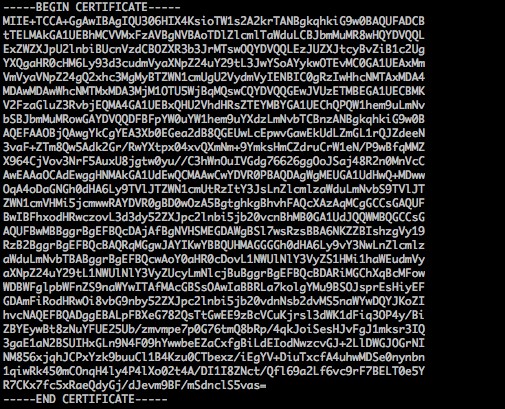
The certificate rules are:- [——-BEGIN CERTIFICATE——-, ——-END CERTIFICATE——-] Beginning and ending; upload these contents together.
- Each line has 64 characters, and the last line has no more than 64 characters.
- Certificate chain issued by the intermediate agency:
——-BEGIN CERTIFICATE——-
——-END CERTIFICATE——-
——-BEGIN CERTIFICATE——-
——-END CERTIFICATE——-
——-BEGIN CERTIFICATE——-
——-END CERTIFICATE——-
The certificate chain rules are:- There cannot be blank lines between certificates.
- Each certificate complies with the above 2.1 Certificate format requirements.
RSA Private Key Format Requirements
For example:
RSA private keys can include all private keys (RSA and DSA), public keys (RSA and DSA), and (x509) certificates. It stores DER format data encoded in Base64, surrounded by an ASCII header, thus suitable for text-mode transmission between systems.
RSA private key rules:
- [——-BEGIN RSA PRIVATE KEY——-, ——-END RSA PRIVATE KEY——-] Beginning and ending; upload these contents together.
- Each line has 64 characters. The last line can be less than 64 characters.
If you do not generate a usable private key in the format of [——-BEGIN PRIVATE KEY——-, ——-END PRIVATE KEY——-] according to the above scheme, you can convert it into a usable private key as follows:
openssl rsa -in old_server_key.pem -out new_server_key.pem
Then upload the contents of new_server_key.pem along with the certificate.
Certificate Conversion to PEM Format Instructions
Currently, the CLB service only supports certificates in PEM format. Certificates in other formats need to be converted to PEM format before they can be uploaded to the CLB service. It is recommended to use the openssl tool for conversion. Below are several popular methods for converting popular certificate formats to PEM format.
Converting certificate format from DER to PEM
The DER format is commonly found in the Java platform.
Certificate conversion: openssl x509 -inform der -in certificate.cer -out certificate.pem
Private key conversion: openssl rsa -inform DER -outform PEM -in privatekey.der -out privatekey.pem
Converting P7B Format Certificates to PEM Format
The P7B format is commonly found in Windows Server and tomcat.
Certificate conversion: openssl pkcs7 -print_certs -in incertificat.p7b -out outcertificate.cer
Get the content [——-BEGIN CERTIFICATE——-, ——-END CERTIFICATE——-] in outcertificat.cer and upload it as the certificate.
Private key conversion: Private keys can usually be exported in the IIS server.
Converting PFX Format Certificates to PEM Format
The PFX format is commonly found in Windows Server.
Certificate conversion: openssl pkcs12 -in certname.pfx -nokeys -out cert.pem
Private key conversion: openssl pkcs12 -in certname.pfx -nocerts -out key.pem -nodes
Converting CER/CRT Format Certificates to PEM Format
For certificates in CER/CRT format, you can convert them by directly changing the certificate file extension. For example, you can simply rename the "servertest.crt" certificate file to "servertest.pem".