

Scenarios
A security group is a stateful virtual firewall with packet filtering. It is used to set network access control for one or more Cloud Virtual Machine (CVM)s and is an important network security isolation method provided by Converge Cloud. Creating a CVM instance necessitates assigning a security group to the instance. Converge Cloud allows users to change the security group to which the instance belongs after creating the CVM instance.
If you want to configure a new security group for the instance, please create a security group first. For specific operations, see Creating Security Group.
Prerequisites
You have logged in to the Cloud Virtual Machine console.
Operation Steps
Changing a Configured Security Group
There are two configuration entries for configuring security groups: configure on the instance management page (that is, the CVM list page) or configure on the instance details page.
Configuring Security Groups on the Instance Management Page
- On the CVM list page, select the CVM you want to reassign to a new security group and click More > Configure Security Group.
- In the Configure Security Group window that pops up, check the new security group name (multiple selections are allowed) and click Confirm to complete the process of changing the security group.
Configuring Security Groups on the Instance Details Page
- On the CVM list page, click the ID/hostname of the CVM instance whose security group needs to be changed to enter the instance details page.
- On the instance details page, click More Actions > Configure Security Group in the upper right corner.
- In the Configure Security Group window that pops up, check the new security group name (multiple selections are allowed) and click Confirm.
Changing a Bound Security Group
- On the CVM list page, click the ID/hostname of the CVM instance whose security group needs to be bound to enter the instance details page.
- On the instance details page, select the Security Group tab and click Bind in the Bound Security Group column.
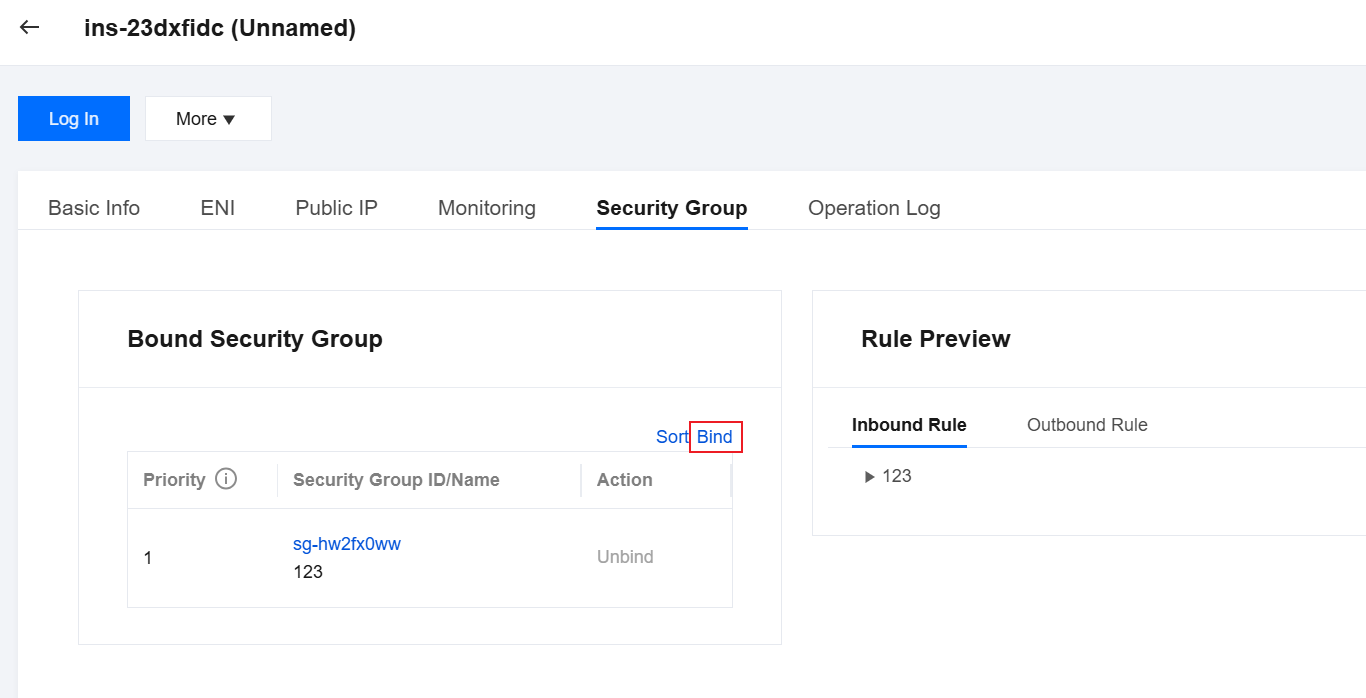
- In the Configure Security Group window that pops up, select the security group to be bound according to actual needs and click OK to complete the binding.
