

Overview
Tag is a key-value pair to identify cloud resources. Tags can help you conveniently classify and manage CVM resources from various dimensions (such as business, purpose, owner, etc.). It should be noted that the tags you set are only used for your management of server resources.
Use Limits
You need to pay attention to the following use limits of tags:
- Quantity limit: Each cloud resource can have up to 50 tags.
- Tag Key Limits:
projectare reserved tag keys by the system and cannot be created.- Only
digits,letters, and+=.@-are allowed, and the length of the tag key cannot exceed 255 characters.
- Tag value limit: It can only be
null character strings or digits,letters, and+=.@-, and the maximum length of the tag value is 127 characters.
Directions and Cases
Case Description
Example: A company purchased 6 CVM instances, and the information of the use department, business scope, and owner of these 6 instances is as follows.
| Instance instance-id | Department | Business Scope | Owner |
|---|---|---|---|
| ins-abcdef1 | E-commerce | Marketing Campaigns | Tom |
| ins-abcdef2 | E-commerce | Marketing Campaigns | Harry |
| ins-abcdef3 | Game | Game A | Jane |
| ins-abcdef4 | Game | Game B | Harry |
| ins-abcdef5 | Entertainment | Post-production | Harry |
| ins-abcdef6 | Entertainment | Post-production | Tom |
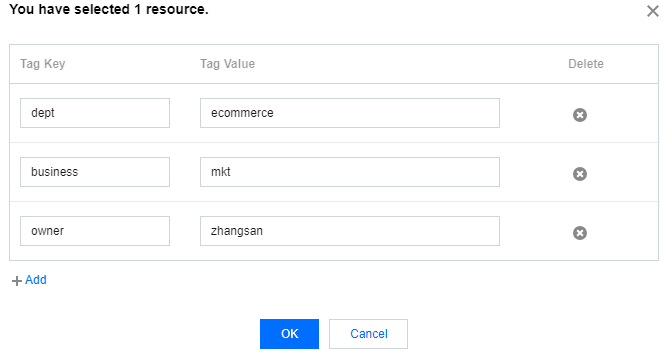
Taking ins-abcdef1 as an example, we can add the following three sets of tags to the instance:
| tag key | tag value |
|---|---|
| dept | ecommerce |
| business | mkt |
| owner | zhangsan |
Similarly, you can also set appropriate tags for other instances based on their use department, business scope, and owner.
Setting Tags in CVM Console
After designing the tag keys and values as detailed above, you can log in to the Converge Cloud CVM console to set tags.
- Log in to the CVM Console.
- In the instance management console, select the instance you want to edit tags for, click More > CVM Settings > Modify Tag.
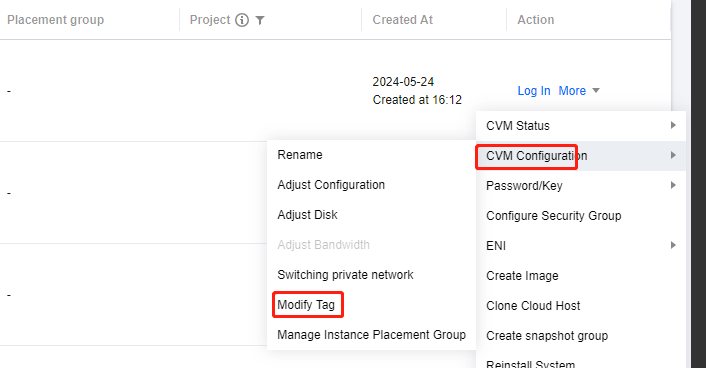
- In the pop-up window titled [You have selected 1 cloud resource], set the tags. As shown below: For example, add three sets of tags to the instance ins-abcdef1.
- Click OK. Then, a prompt will pop up indicating that the modification is successful.
Filtering Instances by Tags
When you want to filter instances of a certain type of tags, you can follow the steps below.
- In the search box, select Tags.
- Enter the tag key and tag value after Tag: and click
 to search.
For example, if you want to filter out CVM resources whose owner is Tom, you can entertag:owner:Tom.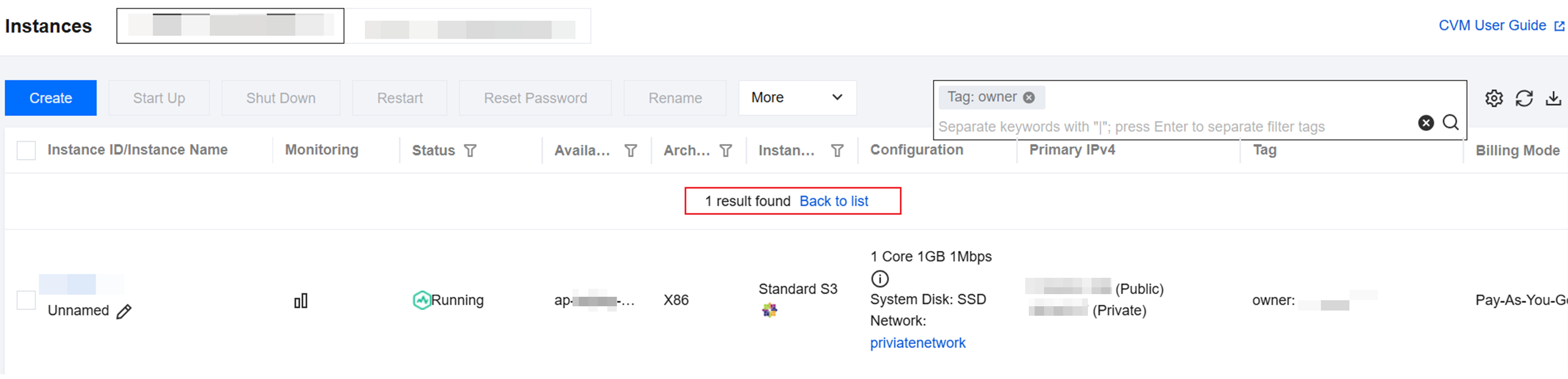
 to search.