

Overview
On the Windows Server operating system, high-performance power management needs to be configured to support soft shutdown of instances. Otherwise, the Cloud Virtual Machine console can only shut down the instance through hard shutdown. This document uses Windows Server 2012 operating system as an example to describe how to configure power management.
Operating Instructions
Modifying power management does not require a computer restart.
Contact engineers to obtain the power management modification and configuration tool power-set-win.bat.
Directions
Log in to the Windows CVM.
You can download the Converge Cloud power management modification and configuration tool (power-set-win.bat) to the C: drive.
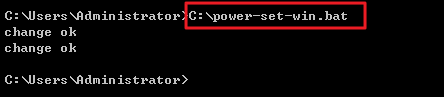
Open power-set-win.bat using the administrator Cloud Platform Command Line Interface (CMD). As shown below:
Run the following command to view the current power management scheme.
powercfg -LThe following results are returned:
In the operating system interface, click
 > Control Panel > System and Security > Power Options to open the Power Options window.
In the Power Options window, click Change Plan Settings.
In the open "Edit Plan Settings" window, modify the idle shutdown times for the monitor and hard disk.
 > Control Panel > System and Security > Power Options to open the Power Options window.