

How to Configure the Firewall Software iptables in Linux System?
Note:
There are significant changes in iptables versions before and after CentOS 7.
- Before CentOS 7, the iptables service was used as the firewall by default. Use
service iptables stopcode, the iptables service will first clear the rules and then uninstall the iptables module. When you restart, the rules are loaded from the configuration file. Stopping the iptables service can test whether there is firewall restriction.
- After CentOS 7, the firewall service is used as the firewall by default. For compatibility, the iptables_filter module is loaded at the same time, but there is no iptables service. So after CentOS 7, you can use the iptables command to add rules, but the iptables service is closed by default. Once the user confirms that the iptable_filter module is loaded, the rules will take effect.
The most reliable way to determine the firewall is to view the rules viaiptables -nvL.
The following two examples illustrate how to configure:
Scenario one
Ubuntu 14 system, security group is open, listening port is enabled, but telnet is not working.
Security group inbound rules:

Security group outbound rules:

Telnet is not working:

Ideas
- First, capture the packet of the host to determine whether the packet has reached the host.
- If the connection does not reach the host, it may be blocked by the security group, upper-layer TGW, or operator.
- If the packet reaches the host, but there is a problem with the return packet, it is most likely caused by the iptables policy inside the host. As shown in the figure below, after telnet, no TCP packet is returned to 64.11.

- After you confirm that it is an iptables policy problem, use
iptables –nvLto check whether the policy allows port 8081 to be opened. This port is not open here.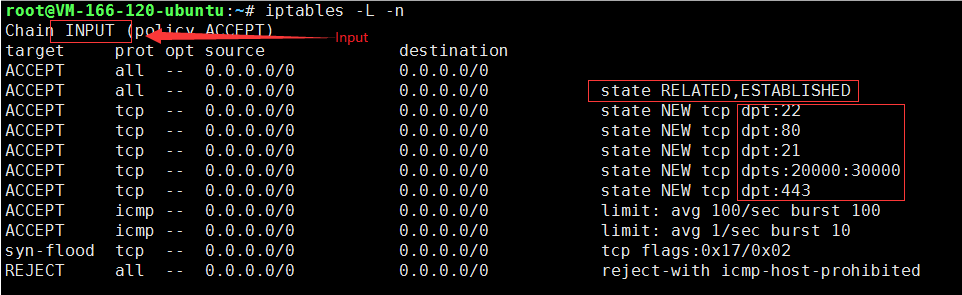
- Use the command to add a policy to allow port 8081 to pass.
iptables -I INPUT 5 -p tcp --dport 8081 -j ACCEPT
- Test port 8081 and it is connected. The problem is solved.
Scenario two
From the iptables configuration, the policy has been released, but the destination machine is still not pingable.
Ideas
If the following situations occur:
Test by using the following command to delete the first rule in the OUTPUT direction:
iptabels –D OUTPUT 1
Test again, and the problem should be solved.
How to Clear the Firewall?
Windows Enstances
- After you log in to the instance, click Start > Control Panel > Firewall Settings to enter the Firewall Settings page.
- Check whether the firewall and other security software (such as SafeDog, etc.) are turned on. If so, just turn them off.
Linux Instance
- Run the command to check whether the customer has enabled the firewall policy. If closed, skip step 2 and proceed directly to step 3:
iptables -vnL
- If the firewall policy is enabled, execute the command to back up the current firewall policy:
iptables-save
- Run the command to clear the firewall policy.
iptables -F
Will using non-Converge Cloud CDN to accelerate CVM to be blocked by the firewall?
No. If you are concerned about the impact, you can turn off the firewall.