

Problem Description
When accessing the CVM locally or accessing other network resources on the CVM, network lag is detected. Use ping command, and find that the network has packet loss or high latency.
Issue Analysis
Packet loss or high latency may be caused by backbone link congestion, link node failure, high server load, system setting problems, etc. After excluding the possible causes from the cloud server itself, you can use MTR for further diagnosis.
MTR is a network diagnostic tool that generates reports that can help you confirm the root cause of network problems.
Solution
This document uses Linux and Windows CVMs as examples to introduce how to use MTR and how to analyze MTR report results.
Refer to the introduction and usage of MTR according to the different host operating systems running MTR.
- WinMTR Introduction and Usage (Windows Operating System)
- MTR Introduction and Usage (Linux Operating System)
WinMTR Introduction and Usage (Windows operating system)
WinMTR: A free network diagnostic tool for Windows systems that integrates Ping and tracert functions and has a graphical page that allows you to intuitively view the response time and packet loss of each node.
Installing WinMTR
- Log in to the Windows CVM.
- On the operating system page, use a browser to access the official website (or legal channels) to download the WinMTR installation package for the corresponding operating system type.
- Unzip the WinMTR installation package.
Using WinMTR
- Double-click WinMTR.exe to open the WinMTR tool.
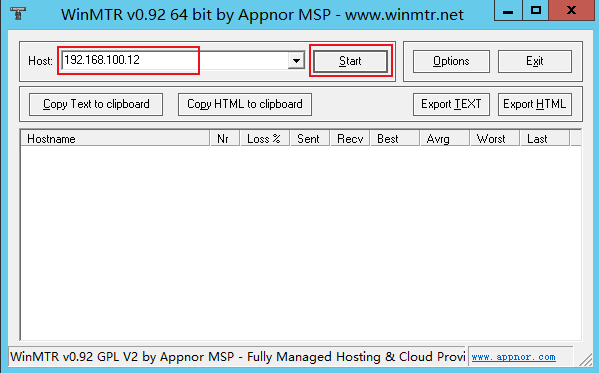
- In the Host field of the WinMTR window, enter the destination server IP or domain name and click Start. As shown below:
- Depending on the actual situation, wait for WinMTR to run for a while, and click Stop to end the test. As shown below:
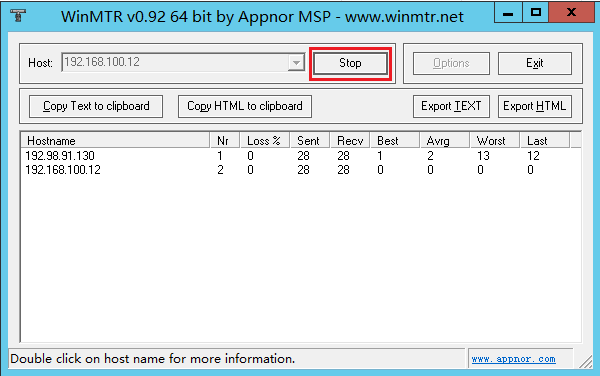
- The main information of the test results is as follows:
- Hostname: Each host IP or name to pass through to reach the destination server.
- Nr : The number of nodes passed.
- Loss% : The packet loss rate of the corresponding node.
- Sent : The number of data packets sent.
- Recv : The number of responses received.
- Best : The shortest response time.
- Avrg: The average response time.
- Worst : The longest response time.
- Last : The most recent response time.
Introduction and Usage of MTR (Linux Operating System)
MTR : A tool for diagnosing network status on the Linux platform, which inherits the functions of Ping, traceroute, and nslookup, and uses ICMP packets by default to test the network connection between two nodes.
Installing MTR
Currently, all existing Linux distributions have MTR pre-installed. If your Linux CVM does not have MTR installed, you can perform the following command to install it:
CentOS operating system:
yum install mtr