

Operation Scenarios
This document describes how to create a private domain. After the private domain is created, you need to set resolution records first before you can associate this domain with a VPC. Once the domain is associated with a VPC, the domain's private network resolution record will overwrite its public network resolution record and prioritize resolution to the VPC network.
Directions
- Log in to the cloud console and select Cloud Services > VPCDNS to enter the VPCDNS console.
- Click Add Private Domain.

- In the pop-up Add Private Domain dialog box, fill in the relevant information for the private domain.
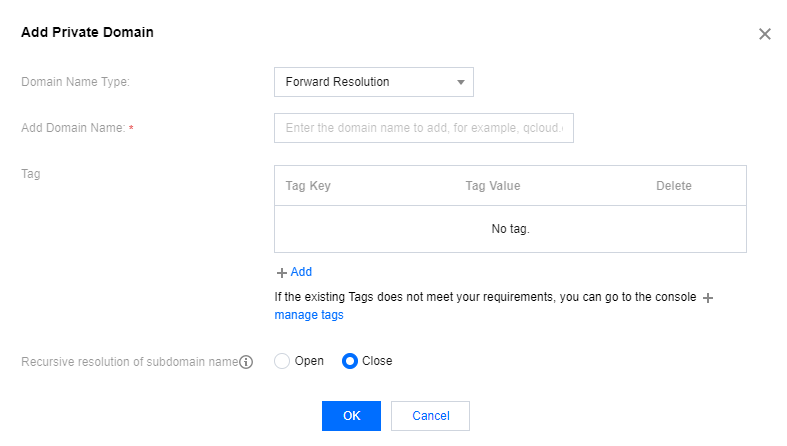
- Domain Type: Select forward resolution.
- Add Domain: Custom your domain.
- Tag: Select a tag. You can categorize, search for, and aggregate cloud resources through tags.
- Subdomain Recursive Resolution: Select according to your actual needs; the default state is Off. For more details, see Subdomain Recursive Resolution Description.
- After setting the parameters, click OK to complete adding the forward resolution of the private domain.
