

When a NAT Gateway is bound to multiple EIPs, you can create SNAT rules to specify the EIPs for public network access for CVMs in different business groups.
For example, when a NAT Gateway is bound to multiple EIPs such as EIP1, EIP2, EIP3, and EIP4, the system automatically performs load balancing to access the public network among all bound EIPs. If EIP1, EIP2, and EIP3 are added to the SNAT address pool, the system uses the EIPs in the SNAT address pool to access the public network and automatically performs load balancing on the EIPs in the SNAT address pool. CVMs without SNAT rules configured can access the public network through all EIPs bound to NAT.
- When the load on the CVM instance surges, one EIP may not be able to support the huge amount of traffic. In this case, multiple EIPs can be configured to share the traffic.
- NAT Gateway supports using the same EIP to configure both SNAT rules and port forwarding rules.
This document describes how to create and manage SNAT rules.
SNAT Rule Limits
- When a NAT Gateway disassociates an EIP, if the EIP is the only EIP in the SNAT rule, the SNAT rule is deleted at the same time; if the EIP is not the only EIP in the SNAT rule, the EIP is deleted from the SNAT rule.
- If the subnet used in the SNAT rule does not exist, the SNAT rule is deleted at the same time.
- If the CVM used in the SNAT rule does not exist, the CVM is deleted from the SNAT rule at the same time. If the CVM is the last CVM in the SNAT rule, the SNAT rule is deleted at the same time.
- Due to standard protocol limits, for the same protocol/destination IP address/destination port, the upper limit of the number of connections = number of bound EIPs x 55,000. To increase the number of connections, add a new bound EIP or adjust the destination IP address/port.
- The description of the rule limit switch for cloud resources accessing the public network through the NAT Gateway is as follows:
- Disabled by default: When no SNAT rules are configured, all cloud resources pointing to the NAT Gateway can access the public network through all EIPs on the NAT Gateway. When SNAT rules are configured, specified cloud resources can access the public network through specified EIPs, while other cloud resources without SNAT rules configured can access the public network through all EIPs on the NAT Gateway.
- After enabling: Only cloud resources configured with SNAT rules are allowed to access the public network through the NAT Gateway; other cloud resources are not allowed to access the public network through the NAT Gateway.
- When an EIP is in the standby status, it does not support binding to SNAT rules. Only the active EIP supports binding.
- EIPs that are bound to SNAT rules cannot be set to standby EIPs.
Prerequisites
Before creating an SNAT rule, ensure that the route table of the subnet points to the corresponding NAT Gateway.
Creating an SNAT Rule
- Log in to the VPC console.
- In the left directory, click NAT Gateway to go to the NAT Gateway List page.
- Click a gateway ID in the list to go to the details page.
- Select the SNAT Rule tab to go to the SNAT Rule Management page.
- Click Create, and the SNAT Rule Creation dialog box pops up.
- Set the SNAT rule.
- Source IP Range Granularity: Supports subnet and CVM granularity.
- Subnet: When a subnet is selected, the route table associated with the subnet should point to the NAT Gateway, and all CVMs in the subnet access the public network according to the SNAT rules.
- CVM: When a CVM is selected, the route table associated with the subnet where the CVM is located should point to the NAT Gateway. Only the selected CVM can access the public network according to the SNAT rules. CVMs without SNAT rules configured can access the public network through all EIPs bound to NAT.
- Subnet: Select a subnet or the subnet to which the CVM belongs.
- CVM: A CVM should be specified only when the source IP range granularity is CVM. Multiple CVMs can be added.
- Public IP Address: Specify the EIP for public network access.
- Description: Custom description information, supporting up to 60 characters.
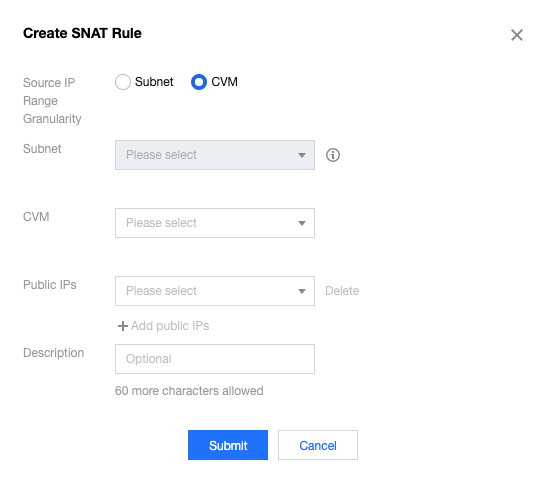
- Source IP Range Granularity: Supports subnet and CVM granularity.
- After the SNAT rule parameter settings are completed, click Submit.
Editing an SNAT Rule
Modifying public IP addresses in the existing SNAT rules may cause the original business connection to be interrupted, which can be restored after reconnection. Proceed with caution.
- On the SNAT Rule tab, click Edit on the right of the SNAT rule entry, and an editing dialog box pops up.
- Modify the public IP address or description in the SNAT rule, and click Submit to complete the modification.
- Click the edit icon next to the description in the SNAT rule to modify it directly.
Querying SNAT Rules
- In the search box in the upper right corner of the SNAT Rule tab, click to select the following filter conditions and enter the corresponding parameter values in the input box.
- Click the search icon for a quick search.
- Click a subnet/CVM ID to redirect to the corresponding resource details page.
Deleting an SNAT Rule
If you do not need to specify an EIP for the CVM to access the public network, you can delete the SNAT rule.
- Single-rule deletion
- On the SNAT Rule tab, click Delete on the right of the SNAT rule entry.
- Click OK to delete the SNAT rule.
- Batch deletion
- On the SNAT Rule tab, select multiple SNAT rules and click Delete above.
- In the pop-up dialog box, click Delete to complete the batch deletion.