

The following operations take "www.sz.com" as an example. The "www.sz.com" domain name is bound to the CLB of this tenant.
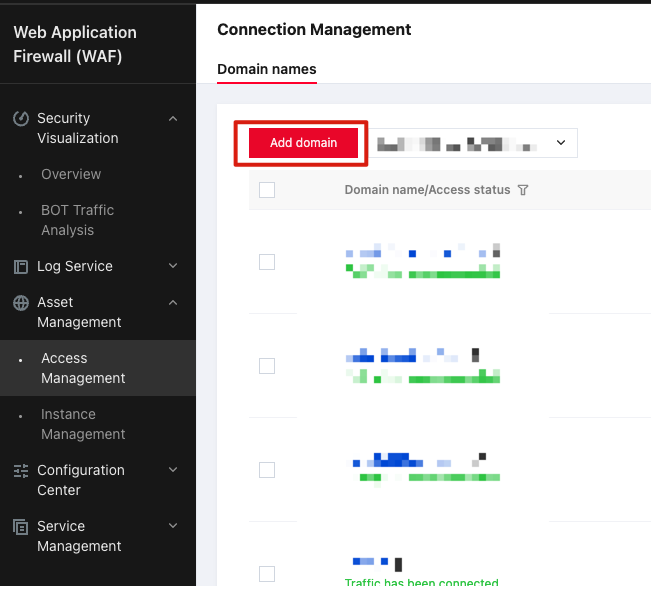
- Log in to the Tenant Side WAF > Asset Center > Access Management page, select an instance, and click Add Domain Name.
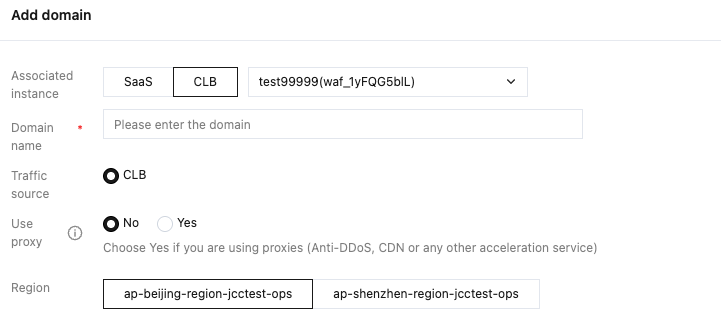
- On the Add Domain page, enter a domain name, select its corresponding load balancer listener, and then click Confirm.

- Enter the Access Management interface and check the domain name protection status.
- Check the domain name/access status and confirm that the added domain name is the expected one.
- Check that the IP in the access information is the VIP in the CLB instance.
- Check that the ID/name of the associated instance is the expected instance ID.
- Check that the filtering mode is in use: The filtering mode can detect traffic and intercept malicious traffic; the image mode cannot intercept traffic but can detect traffic.
- Check that the WAF switch is in the blue enabled status.

