

Overview
Versioning is used to store multiple versions of an object in the same bucket. For example, in one bucket, you can store multiple objects with the same object key "picture.jpg", but they have different version IDs such as 100000, 100101, and 120002. After enabling the versioning feature for a bucket, you can query, delete, or restore the objects stored in the bucket by their version IDs. This enables you to restore lost data caused by accidental deletion or application faults. For example, when you delete an object with visioning enabled:
- If you need to delete the object (not permanently), COS will insert a delete marker for the deleted object, and the marker will serve as the current object version. You can restore the object to its previous version based on Delete Marker.
- If you need to replace the object, COS will insert a new version ID for your recently uploaded object. In this case, you can also restore the original object based on the version ID.
Versioning Status
There are three versioning statuses for a bucket: Versioning not enabled, versioning enabled, and versioning suspended.
- Versioning not enabled: The initial versioning status of a bucket by default. In this status, the versioning feature is disabled.
- Versioning enabled: The versioning feature of a bucket is enabled. In this status, versioning is enabled. The versioning status will be applied to All Objects in the bucket. After you enable versioning for the bucket for the first time, the recently uploaded objects in the bucket will have a unique version ID.
- Versioning suspended: Once the versioning state is changed from enabled to suspended (versioning cannot be disabled once enabled), objects uploaded to the bucket thereafter will no longer be subject to versioning.
Note:
- Once versioning is enabled for a bucket, it cannot be disabled (the initial status). However, versioning for the bucket can be suspended, so that the recently uploaded objects afterward will not generate multiple versions.
- Before versioning is enabled, the version IDs of all the objects stored in the bucket are null.
- Enabling or suspending versioning will change how COS makes requests when it handles the objects, but will not change the objects themselves.
- Only the root account and authorized sub-accounts can suspend versioning for a bucket.
Managing Objects Under Versioning Status
Buckets are in different versioning statuses. You can upload, query, and delete objects in buckets in different statuses. In addition to the disabled, enabled, and suspended versioning statuses, operations for querying objects in a bucket and deleting objects also include operations without specifying a Version ID and operations with specifying a Version ID.
- When the versioning status is disabled, operations such as uploading, querying, and deleting objects remain unchanged.
- When the versioning status is enabled or suspended, operations such as uploading, querying, and deleting objects are different from previous methods in that the Version ID is introduced. The concept of Delete Marker is also included in the operation of deleting objects.
Managing Objects with Versioning Enabled
Before bucket versioning is enabled, the Version IDs of objects already stored in the bucket are null. After enabling versioning, existing objects in the bucket will not be changed. It only changes the way COS handles existing objects (such as the request method). At this point, newly added objects with the same name exist in the same bucket as different versions.
Note:
Users upload objects in the same way to both versioning-disabled and versioning-enabled buckets, but their Version IDs are different. In the second method, the COS assigns a specific Version ID to the object, while the Version ID of the object uploaded in the first method is always null.
Uploading an Object
After versioning is enabled for a bucket, when a user performs a PUT, POST, or COPY operation, COS automatically adds a unique Version ID to the object placed in the bucket.
As shown in the image below, when you upload an object in a bucket with versioning enabled, Object Storage adds a unique version ID to the object.
Listing Versioning Objects
COS stores the version information of objects in the versions parameter associated with the bucket. COS returns object versions in the order of storage time, returning the most recently stored version first.
Querying All Versions of a Specific Object
You can use the versions parameter and the prefix request parameter to query all versions of an object through the following procedures. For more prefix information, see the GET Bucket Object Versions documentation.
You can query all versions of a specific object. The request sample is shown below:
GET /?versions&prefix=OjectKey HTTP/1.1
Querying the Metadata Version
When a user uses a GET request without specifying a Version ID, the current version of the object will be queried. As shown in the following figure, the GET request will return the current version (latest version) of the 123.txt object.
If the user specifies the VersionId when using the GET request, the object with the specified Version ID is queried. As shown in the following figure, the GET VersionId request queries the object of the specified version (which can be the current version).
Querying the Metadata of Object Versions
If you need to query only the metadata of an object (not its contents), you can use the HEAD operation. By default, you will get the latest version of the metadata. If you want to query the metadata of a specific object version, you need to specify its Version ID when sending a request.
The steps to query the metadata of a specified version of an object are as follows:
- Set VersionId to the Version ID of the object metadata being queried.
- Send a HEAD operation request with the specified VersionId.
Deleting an Object
You can delete unnecessary object versions at any time as needed. When versioning is enabled, there are two scenes for users to use the DELETE request:
Deleting objects: Perform a simple DELETE operation without users specifying a version ID.
This overview is similar to putting the deleted objects into the "recycle bin," but not completely removing them. If needed later, users can still retrieve the data.
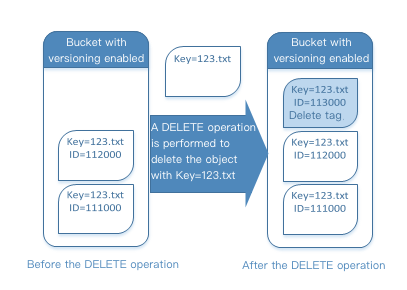
As shown below, if users do not specify a version ID during the DELETE operation, the object with Key=123.txt will not be deleted actually. Instead, a new deletion marker is inserted, and a new version ID is added.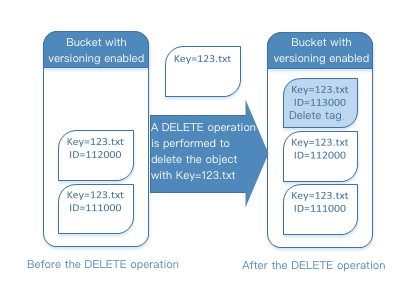
Note:
COS will insert a delete marker with a new version ID for the deleted object in the storage bucket. This delete marker will become the current version of the deleted object. When you attempt to perform a GET operation on an object with a delete marker, COS will assume that the objects do not exist and will return a 404 error.
The user specifies the Version ID and executes an operation to delete the object version. In this scene, the versioning object can be permanently deleted.
Deleting Markers
The delete marker is used for versioning objects. In COS, the delete marker can be considered as a marker indicating that the object has been deleted. Delete markers can be considered markers with objects that have been deleted. The differences are as follows:
- The content of the delete marker is empty.
- There is no ACL value for the delete marker.
- The delete marker executes a GET request, which returns a 404 error. The response header is
x-cos-delete-marker: true. - The delete marker only supports DELETE operations (requests must be issued under the root account).
Deleting a Delete Marker
If the user needs to delete the delete marker, he can specify its version ID in the DELETE Object versionId request to permanently delete the Delete Marker. If you do not specify the VersionId of a delete marker and issue a DELETE request for a delete marker, COS will not delete the delete marker but will insert a new one.
As shown in the following figure, executing a general DELETE request on a delete marker does not delete anything but adds a new delete marker to the bucket.
In a versioning-enabled bucket, newly added delete markers will have a unique VersionId. Therefore, in a bucket, the same object may have multiple delete markers. To permanently delete a Delete Marker, you must include its version ID in the DELETE Object versionId request.
As shown in the following figure, execute the DELETE Object versionId request to permanently delete the Delete Marker.
Note:
Only the root account can permanently remove the Delete Marker.
Steps to permanently delete the Delete Marker:
- Set versionId to the versionId of the delete marker.
- Send a DELETE Object versionId request.
Restoring to an Earlier Version
Versioning can be used to restore an earlier version of an object. There are two ways to do this:
- Copy an earlier version of an object to the same bucket.
The copied object becomes the current version of the object, and all object versions are preserved. - Permanently delete the current version of an object.
When you delete the current object version, you actually convert the previous version to the current version of the object.
Managing Objects with Versioning Suspended Status
When you suspend versioning, existing objects in the bucket are not changed. What changes is how the COS handles the object in subsequent requests. The following describes how to manage objects in a bucket where versioning has been suspended.
Uploading an Object
After versioning is suspended on a bucket, when a user performs a PUT, POST, or COPY operation, COS automatically adds a Version ID of null to objects placed in the bucket. As shown in the following figure:
If there are versioning objects in the bucket, the object uploaded to the bucket becomes the current version, and the Version ID is null. As shown in the following figure:
If an empty version already exists in the bucket, it will be overwritten, and the original object content will be replaced accordingly, as shown in the following figure:
Querying the Metadata Version
On a bucket with versioning suspended, a user issuing a GET Object request will return the current version of the object.
Deleting an Object
If versioning is suspended, the following occurs when executing a DELETE request:
If there is an empty version of an object in the bucket, the object whose Version ID is null will be deleted.
As shown in the following figure, when a user performs a general DELETE operation, COS inserts a delete marker for the empty version of the object.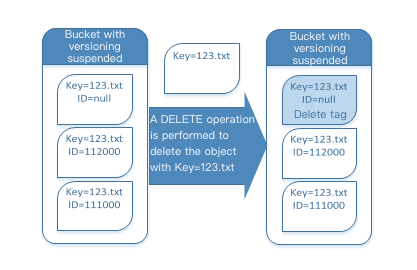
Note:
The delete marker does not contain any content. When the delete marker replaces the empty version, the original content of the empty version will be lost.
There is no empty version of the object in the bucket, and a delete marker is added to the bucket.
As shown in the following figure, if there is no empty version in the bucket, the user will not delete anything when performing the DELETE operation. COS only inserts a delete marker.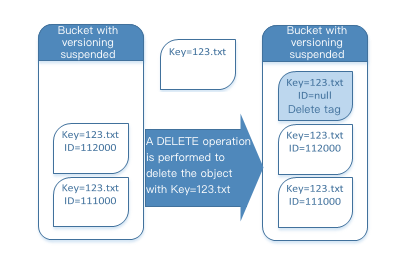
Even in a bucket where versioning has been suspended, the root account can permanently delete a specified version.
As shown in the following figure, deleting a specified object version permanently deletes the object.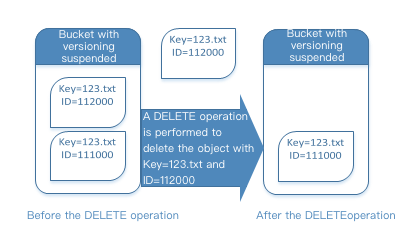
Note:
Only the root account can delete a specified object version.
