

Key-Related Issues
Where can I view key information such as APPID, SecretId, and SecretKey?
The second half of a bucket name is the APPID. You can view it by logging in to the COS console. To view information such as SecretId and SecretKey, log in to Cloud Access Management > Cloud API Key.
What should be done if key-related information such as APPID and SecretId, is leaked?
Users can delete the leaked keys and create new ones.
ACL+ Policy and Other Permission Issues
What if the error 403 forbidden occurs or access permission is rejected when I perform upload/download and other operations?
Follow the steps below to troubleshoot the issue step by step:
- Check whether your following configuration information is correct:
BucketName, APPID, Region, SecretId, SecretKey, etc. - After ensuring that the above information is correct, check whether you are using a sub-account for operation. If you are using a sub-account, check whether the root account has authorized the sub-account. Otherwise, you should log in to the root account first to authorize the sub-account.
For more information on permissions, see Access Management Permission Setting Related Cases. - If you use a temporary key to perform an operation, check whether the current operation is within the policy set when obtaining the temporary key. Otherwise, you should modify the related Policy settings.
When accessing a public read bucket using the bucket's default domain, a file list is returned. How can I hide the file list information?
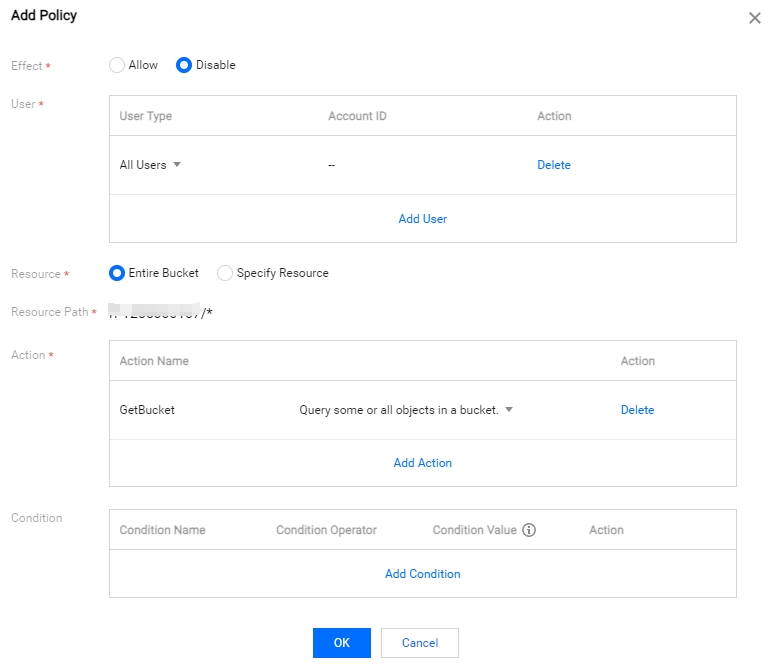
You can set a Get Bucket permission to deny anyone for the corresponding storage bucket. The steps are as follows:
Log in to the COS console, select the bucket list, and enter the Permission Management of the corresponding storage bucket page.
Method 1:
- Find Policy Permission Settings, and click Add Policy under Graphical Settings.
- Add the corresponding permission settings as shown in the figure below and click OK.
Method 2:
Find Policy Permission Settings, click Policy Syntax > Modify, and enter the following expressions:
{
  "Statement": [
    {
      "Action": [
        "name/cos:GetBucket",
        "name/cos:GetBucketObjectVersions"
      ],
      "Effect": "Deny",
      "Principal": {
        "qcs": [
          "qcs::cam::anyone:anyone"
        ]
      },
      "Resource": [
        "qcs::cos:ap-city:uid/1250000000:examplebucket-1250000000/*"
      ]
    }
  ],
  "version": "2.0"
}
Note:
Replace the relevant information in
"qcs::cos:ap-city:uid/1250000000:examplebucket-1250000000/*"with the following:
"ap-city"is replaced with the region where your bucket is located."1250000000"is replaced with your APPID information."examplebucket-1250000000"is replaced with your bucket name.
Among them, APPID is the second half of the bucket name. You can view the bucket name in the COS Console.
Is the ACL restriction on COS for buckets or accounts? Is it possible to specify permissions when uploading files?
ACL restrictions are for the account. It is not recommended to specify permissions when uploading files, as this may cause an error if the ACL + Policy exceeds 1,000.
How do I authorize collaborators to access a specified bucket?
A collaborator account is a special sub-account. For more information, see Access Policy Language Overview.
If multiple businesses need to operate on a bucket, is it possible to isolate permissions based on buckets or other dimensions?
Log in to the CAM console and enter the user management page. You can enable sub-accounts for different businesses and grant different authorization operations.
What if the error: your policy or acl has reached the limit (Status Code: 400; Error Code: PolicyFull) is displayed when uploading files or creating buckets?
The maximum quantities of the buckets and object ACL + Policy rules under each COS root account is 1,000. When the number of related ACLs or Policy sets is greater than 1,000, this error appears. Therefore, it is recommended that useless ACLs or Policies should be deleted.
Note:
We do not recommend using file-level ACLs or Policies. We recommend that when you call the API or SDK if you do not need to perform special ACL control on files, leave the ACL-related parameters (such as x-cos-acl and ACL) blank to keep the inherited storage bucket permissions.
How do I create a sub-account for a subsidiary or employee and authorize access permissions to a specific bucket?
For more information, see Granting Sub-Accounts Access to COS to create sub-accounts and grant them permissions.
How can I grant certain sub-accounts permission to operate only a certain bucket?
If you want the sub-account to have only operation permissions for a specific bucket, you can use the sub-account to add a path.
How do I use account A to authorize account B to have write permission on the buckets under account A?
For more information, see ACL Access Control Practice and CAM Access Management Practice to grant permissions.
Anti-hotlinking Issues
Can I set up an allowlist to allow access, and also allow access when the browser opens the link alone?
When setting up anti-hotlinking, select allow empty referer, and you can access the link by opening it in a browser alone, even if you set up an allowlist.
The anti-hotlinking allowlist of the storage bucket test is set, and a.com is allowed to access. But why cannot the web player under a.com playback video files in the bucket test?
When using Windows Media Player, Flash Player, and other players to playback video links on a web page, the referer in the request is empty, resulting in failure to hit the allowlist. It is recommended that an empty referer be allowed when setting the allowlist.