

One-Origin Policy
The one-origin policy restricts the way that files/scripts loaded from one origin interact with resources from another origin and is a key security mechanism for isolating potential malicious files. Resources with the same protocol, domain name (or IP address), and port are considered to belong to the same origin. Scripts in one origin can only be used to read/write resources in the origin and cannot be used to access resources in other origins. This security limit is called a one-origin policy.
One-Origin Definition
Webpages that have the same protocol, domain name, and port (if specified) are regarded as from the same origin. The following table describes how to test whether a webpage belongs to the same origin as http://www.example.com/dir/page.html:
| URL | Result | Possible Causes |
|---|---|---|
http://www.example.com/dir2/other.html |
Succeeded | Same protocol, domain name, and port |
http://www.example.com/dir/inner/another.html |
Succeeded | Same protocol, domain name, and port |
http://www.example.com/secure.html |
Failed | Different protocols (https) |
http://www.example.com:81/dir/etc.html |
Failed | Different ports (81) |
http://news.example.com/dir/other.html |
Failed | Different domain names |
Cross-Origin Access
Cross-origin resource sharing (CORS) is also known as cross-origin access. It allows web application servers to control cross-origin access to ensure secure cross-origin data transfer. Both the browser and server need to support CORS before you can use it. The feature is compatible with all browsers. For IE, IE 10 or later is required.
The entire CORS communication process is automatically completed by the browser without any manual intervention. For developers, CORS communication and one-origin AJAX communication work in the same way and use the same code. Once the browser identifies an AJAX request for cross-origin access, it automatically adds additional header information. In some cases, an additional request is made, without being perceived by users.
Therefore, the key to CORS communication lies in the server. As long as the server implements CORS APIs, cross-origin communication can be achieved.
CORS Use Cases
Users use CORS when using a browser because access permissions are controlled by the browser instead of the server. Therefore, when other clients are used, there is no need to worry about cross-origin issues.
CORS is mainly used to directly access COS data or upload and download data on the browser side by using AJAX, without needing to go through the user's application server. For websites that use both COS and AJAX, it is recommended that CORS be used to achieve direct communication with COS.
COS Support for CORS
COS allows you to configure CORS rules to allow or deny cross-origin requests as required. The CORS rules are configured for buckets.
Whether a CORS request is allowed is independent of COS identity authentication. In other words, CORS rules of COS are only used to determine whether to add CORS-related headers. The browser determines whether to block a request.
All object-related APIs and multipart-related APIs of COS support CORS-related authentication.
Note:
When two webpages that come from
www.a.comandwww.b.com, respectively and run in the same browser request the same cross-origin resource at the same time and the request fromwww.a.comarrives at the server first, the server returns the resource to the user ofwww.a.comwith the Access-Control-Allow-Origin header. Ifwww.b.comsends a request later, the browser returns the cached response of the last request to the user. As the header content does not match the CORS-required content, thewww.b.comrequest fails.
CORS Configuration Example
The following example shows how to configure CORS to obtain data from COS by using AJAX. The permission to the bucket used in the example is set to Public. To access a bucket with the private permission, add the signature in the request and retain the other configurations unchanged.
The bucket used in the following example is named corstest and the permission to the bucket is public read and private write.
Preparations
Check whether file access is normal.
Upload a text document named test.txt to corstest. The test.txt access address ishttp://corstest-125xxxxxxx.cos.city.yfm4.fsphere.cn/test.txt.
Use curl to directly access this text document. Replace the following URL with your file address:curl http://corstest-125xxxxxxx.cos.city.yfm4.fsphere.cn/test.txtReturn the content of the test.txt file: test indicates that the file can be accessed normally.

Access the file by using AJAX.
The following describes how to access the test.txt file by using AJAX.Write a simple HTML file, copy the following code into it, save it as an HTML file locally, and open it with a browser. Since no custom header is set, pre-check is not required for this request.
<!doctype html>
<html lang="en">
<head>
    <meta charset="UTF-8">
</head>
<body>
<a href="javascript:test()">Test CORS</a>
<script>
    function test() {
        var url = 'http://corstest-125xxxxxxx.cos.city.yfm4.fsphere.cn/test.txt';
        var xhr = new XMLHttpRequest();
        xhr.open('HEAD', url);
        xhr.onload = function () {
            var headers = xhr.getAllResponseHeaders().replace(/\r\n/g, '\n');
            alert('request success, CORS allow.\n' +
                'url: ' + url + '\n' +
                'status: ' + xhr.status + '\n' +
                'headers:\n' + headers);
        };
        xhr.onerror = function () {
            alert('request error, maybe CORS error.');
        };
        xhr.send();
    }
</script>
</body>
</html>
Open the HTML file in the browser and click Test CORS to send a request. "No permission to access because the Access-Control-Allow-Origin header was not found." is displayed. This is because CORS is not configured for the server.

Access failed. Enter the Header page to check the cause. The browser sends a request with an Origin, indicating a cross-origin request.
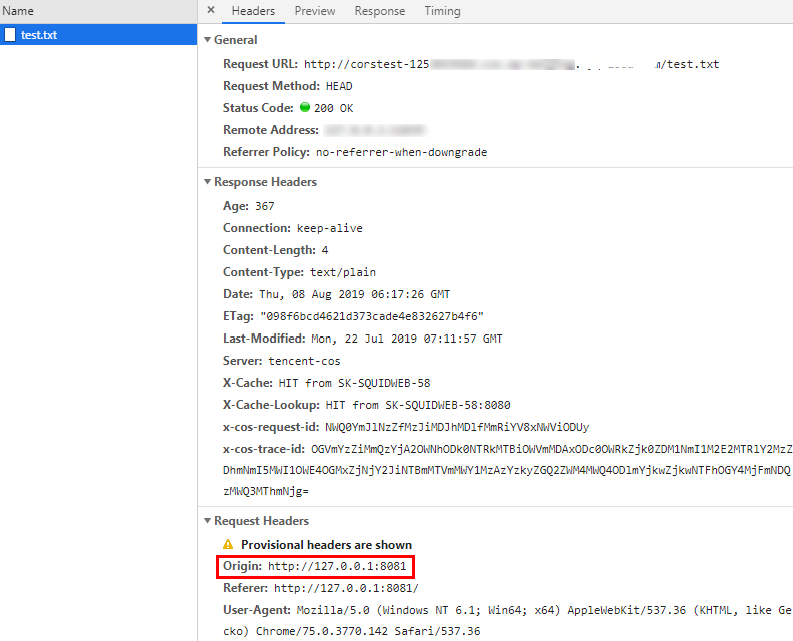
Note:
Because the webpage is set up on the server with the address
http://127.0.0.1:8081, and the Origin ishttp://127.0.0.1:8081.
Configuring CORS
After the cause of the access failure is determined, you can solve the problem by configuring CORS for the bucket. In this example, CORS is configured in the COS console, which is recommended if your CORS configuration is simple.
- Log in to the COS console and click Bucket List to enter the related bucket.
- In the left navigation tree, choose Security Management > CORS Settings to enter the cross-origin access CORS settings page.
- Click Add Rule to add the first rule with the following least restricted configuration:
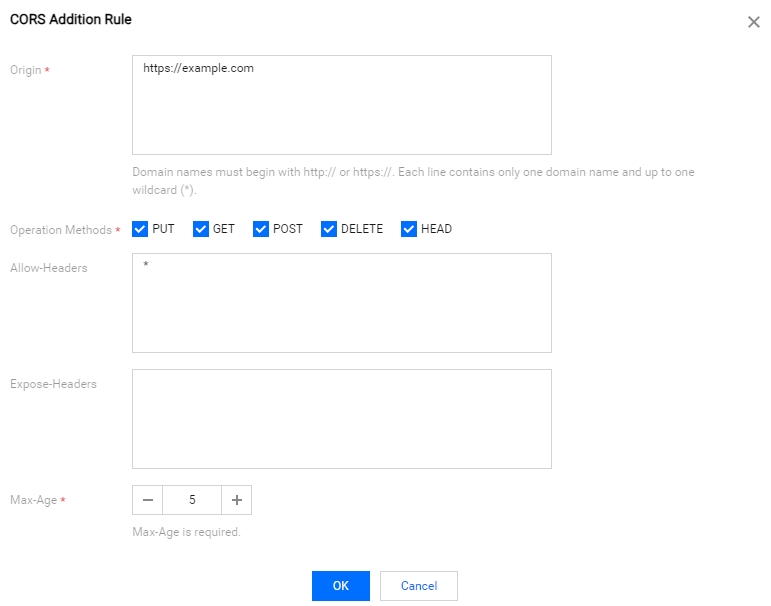
Note:
The CORS configuration consists of multiple rules, which are matched from top to bottom. The first matched rule prevails.
Verification Result
After the configuration is completed, try to access the test.txt file again. The following figure shows the result, indicating that the access is normal.
Troubleshooting and Suggestions
To avoid problems related to cross-origin access, you can set the least restricted CORS configuration as described above to allow all cross-origin requests. If an error still occurs under this configuration, the root cause may lie in other factors rather than CORS.
In addition to the least restricted configuration, you can configure a more refined control mechanism. For example, in this example, you can use the following minimum configuration to ensure a successful match:
Therefore, for most scenarios, it is recommended that you use the minimum configuration based on your usage scenario to ensure security.
CORS Configuration Items
CORS configuration items are as follows:
Origin
The sources from which cross-origin requests are allowed.
- More than one header can be specified, with one header per line.
- You can set a
*, indicating that all domains are allowed, which is not recommended. - A single specific domain name is supported, such as
http://www.abc.com. - Second-level wildcard domain names, for example,
http://*.abc.com, are supported. Note that each line can contain only one asterisk*. - Be careful not to omit the protocol name (http or https). If the port is not the default port 80, you also need to add a port.
Methods
Enumeration of one or more methods is allowed for a cross-origin request.
For example: GET, PUT, POST, DELETE, HEAD.
Allow-Headers
Header of allowed cross-origin requests.
- More than one header can be specified, with one header per line.
- Header is easily missed. Unless otherwise specified, it is recommended that it be set to *, indicating that all requests are allowed.
- There is no case sensitive.
- Each Header specified in Access-Control-Request-Headers must correspond to a value in Allowed-Header.
Expose-Headers
A list of headers exposed to the browser. That is, the response headers that you access from the application (for example, the XMLHttpRequest object of JavaScript).
- The configuration should be determined based on the requirements of the application. ETag is recommended by default.
- A wildcard is not allowed. The headers are case-insensitive, with one header per line.
Max-Age
The time (in seconds) that the browser can cache the results of a prefetch request (OPTIONS request) for specific resources. In general cases, you can set it to a larger value, for example, 60 seconds.
This configuration item is optional.