

Cases for Authorization Through a Bucket Policy
Preparations
Create a bucket.
Authorization through a bucket policy applies only to specific buckets, and you need to create a bucket first. If account-level authorization is required, see Cases Related to Permission Settings in this document.Prepare the UIN of the account to be authorized.
It is assumed that the UIN of the root account owning the target bucket is 100000000001, and the UIN of a sub-account under it is 100000000011. The sub-account needs to be authorized to access the target bucket.Note:
- To query sub-accounts created under the root account, log in to the CAM console and view them in the user list.
- To create a sub-account, see Creating a Sub-User.
Open the Add Policy dialog box.
Go to Permission Management of the target bucket, select Policy Permission Settings > Graphical Settings, and click the target bucket name to open the Add Policy dialog box. Then, configure the policy based on the authorization cases in this document. For detailed guidance on how to add a policy, see Adding a Bucket Policy.
The following lists several different authorization cases, and you can configure data based on the actual situation.
Authorization Cases
Case 1: Authorizing a Sub-account All Permissions to a Specific Directory
The following table describes the configuration information.
| Configuration Item | Configuration Value |
|---|---|
| Effect | Allow |
| User Type | Sub-account |
| Account ID. | UIN of a sub-account, which should be a sub-account under the root account, for example, 100000000011 |
| Resources | Specified resource |
| Resource path | Specified directory prefix, such as folder/sub-folder/, which should be ended with / |
| Operation name | All operations |

Case 2: Authorizing a Sub-account the Read Permission to Files in a Specific Directory
The following table describes the configuration information.
| Configuration Item | Configuration Value |
|---|---|
| Effect | Allow |
| User Type | Sub-account |
| Account ID. | UIN of a sub-account, which should be a sub-account under the root account, for example, 100000000011 |
| Resources | Specified resource |
| Resource path | Specified directory prefix, such as folder/sub-folder/, which should be ended with / |
| Operation name | Read operation (including displaying the object list) |

Case 3: Authorizing a Sub-account the Read and Write Permissions to a Specific File
The following table describes the configuration information.
| Configuration Item | Configuration Value |
|---|---|
| Effect | Allow |
| User Type | Sub-account |
| Account ID. | UIN of a sub-account, which should be a sub-account under the root account, for example, 100000000011 |
| Resources | Specified resource |
| Resource path | Specific object key, such as folder/sub-folder/exampleobject |
| Operation name | All operations |

Case 4: Authorizing a Sub-account the Read and Write Permissions to All Files in a Specific Directory and Prohibiting the Read and Write Permissions to Specified Files in the Directory
In this case, two policies: Allow and Deny need to be added.
- First, add the Allow policy. The following table describes the configuration information.
Configuration Item Configuration Value Effect Allow User Type Sub-account Account ID. UIN of a sub-account, which should be a sub-account under the root account, for example, 100000000011 Resources Specified resource Resource path Specified directory prefix, such as folder/sub-folder/, which should be ended with/Operation name All operations 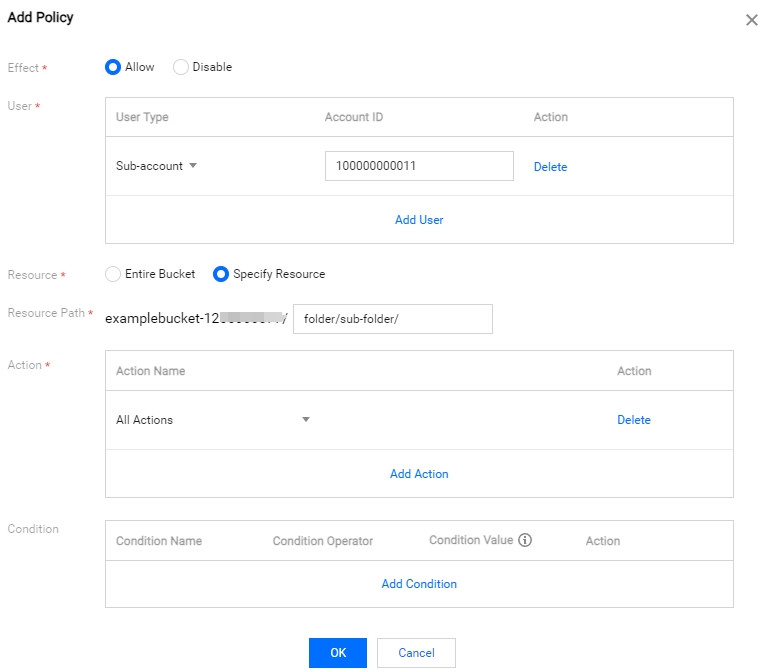
- Then, add the Prohibit policy. The following table describes the configuration information.
Configuration Item Configuration Value Effect Prohibit User Type Sub-account Account ID UIN of a sub-account, which should be a sub-account under the root account, for example, 100000000011 Resources Specified resource Resource path Object key to be prohibited to access, such as folder/sub-folder/privateobjectOperation name All operations 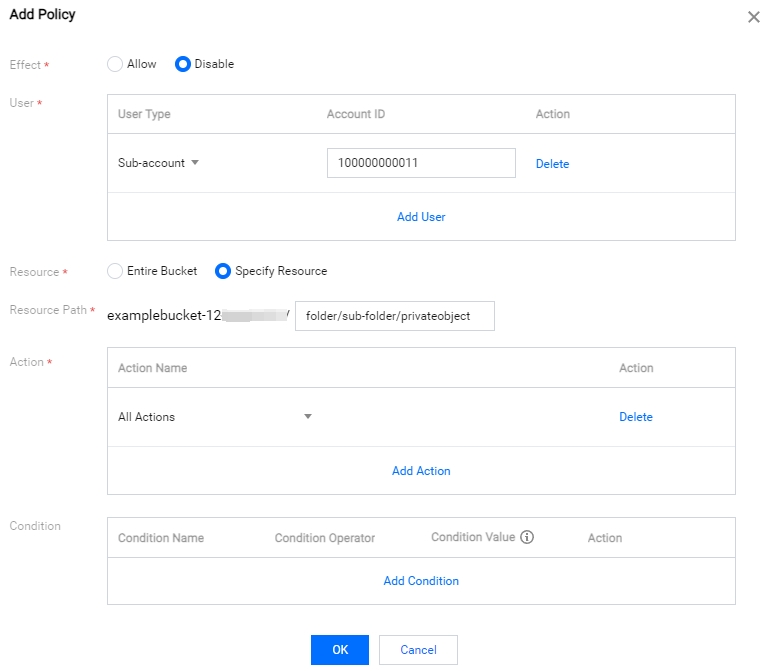
Case 5: Authorizing a Sub-account the Read and Write Permissions to Files with a Specified Prefix
The following table describes the configuration information.
| Configuration Item | Configuration Value |
|---|---|
| Effect | Allow |
| User Type | Sub-account |
| Account ID | UIN of a sub-account, which should be a sub-account under the root account, for example, 100000000011 |
| Resources | Specified resource |
| Resource path | Specified prefix, such as folder/sub-folder/prefix |
| Operation name | All operations |
