

Overview
The client supports private/public network IPV6 access and accesses COS via IPV6.
Setting IPV6 for Bucket Policy
- Go to the bucket list page, select Permission Management > Policy Permission Settings on the left, and click Add Policy.
- Fill in the information to be set and set the condition to IP equal to the IPV6 condition value, as shown in the following figure:
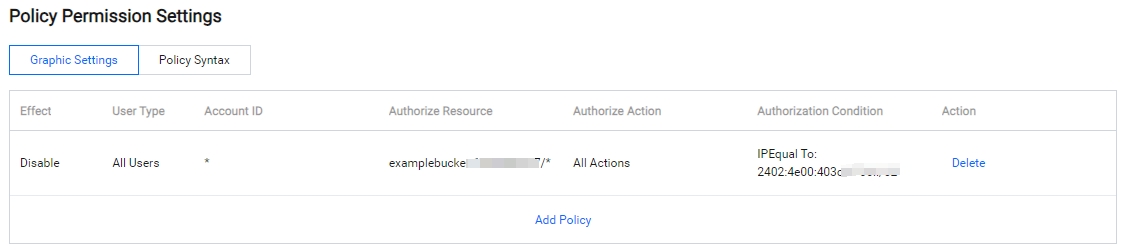
At this time, all users will be prohibited from accessing all operations on the bucket through the IPv6 address.
Setting IPV6 for CORS
- Go to the bucket file list page, select Security Management > CORS Settings, and click Add Rule.
- Set the allowed source Origion to the IPV6 address, as shown in the following figure:

Cross-origin access will now be allowed for this domain.
Setting IPV6 for Hotlink Protection
- Go to the bucket file list page, select Security Management > Hotlink Protection Settings, and click Modify.
- Set Referer to the IPV6 address, as shown below:
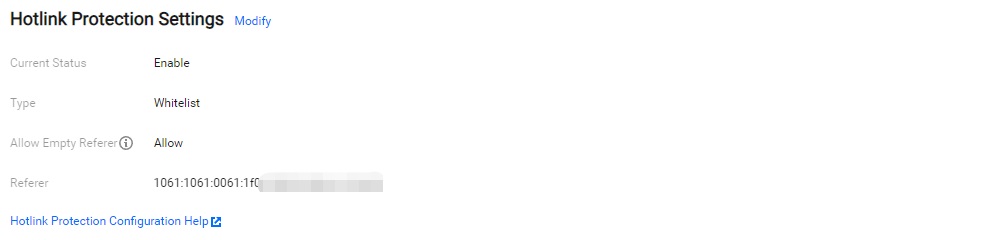
The domain in the list will be allowed to access the bucket.
