

Overview
In order to prevent malicious programs from using resource URLs to steal public network traffic or using malicious methods to steal resources, causing unnecessary losses to users. COS supports anti-hotlinking configuration. It is recommended that you configure blocklist/allowlist through the anti-hotlinking settings on the console for security protection.
Directions
- Log in to the COS console.
- In the left sidebar, select Bucket List to go to the bucket list page.
- Locate the bucket for which you want to set anti-hotlinking, and click its name to enter the bucket management page.
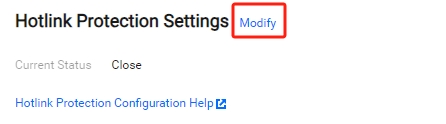
- Select Security Management > Hotlink Protection Settings and click Modify to enter the editing status.
- Switch the current status to Enable, select a list type (blocklist or allowlist), set the corresponding domain, and then click Save. The configuration items are described as follows:
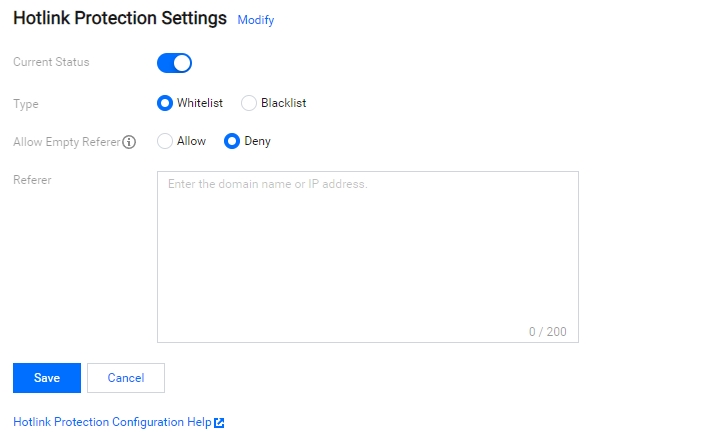
- Blocklist: Restricts domain names on the list to accessing the default access address of the bucket. If a domain name in the list accesses the default access address of the bucket, a 403 error will be returned.
- Allowlist: Restricts domain names not on the list to accessing the default access address of the bucket. If a domain name not in the list accesses the default access address of the bucket, a 403 error will be returned.
- Allow Empty Referer: The referer in an HTTP request header is left empty (there is no referer field or the referer field is empty).
- Referer: Enter up to 10 domain names or IP addresses (one per line). The wildcards
*is supported. For example:- Configure
www.example.com: It can limits address with the prefix ofwww.example.comsuch aswww.example.com/123andwww.example.com.cn. - Domain names and IPs with ports are supported, such as
www.example.com:8080and10.10.10.10:8080. - Configure
*.example.com: It can limits address such asa.b.example.com/123anda.example.com.
- Configure
Example
A user with the APPID of 1250000000 creates a bucket named examplebucket-1250000000 and places an image picture.jpg in the root directory. COS has generated the following default access address according to the rules:
examplebucket-1250000000.cos.city.yfm4.fsphere.cn/picture.jpg
User A owns a website:
www.example.com
And embeds the image into the home page index.html.
Webmaster B manages a website:
www.fake.com
Webmaster B wants to put this picture on www.fake.com. But he does not want to pay for traffic costs. He creates a direct link to picture.jpg through the following address and places it into the homepage index.html on www.fake.com.
examplebucket-1250000000.cos.city.yfm4.fsphere.cn/picture.jpg
In such cases, to avoid losses for User A, we provide the following two methods of anti-hotlinking.
Method One
Configure the Blocklist, fill in *.fake.com to set the domain name, and save it to take effect.
Method Two
Configure the Allowlist, fill in *.example.com to set the domain name, and save it to take effect.
Before Enabled
The image is displayed normally when http://www.example.com/index.html is accessed.
The image is also displayed normally when http://www.fake.com/index.html is accessed.
After Enabled
The image is displayed normally when http://www.example.com/index.html is accessed.
The image cannot be displayed when http://www.fake.com/index.html is accessed.