

Overview
The log management feature allows you to record various request logs related to bucket operations. Enabling the log management feature can help you better manage and use your buckets.
Directions
Log in to the COS console.
In the left sidebar, click Bucket List to go to the bucket list page.
Find the source bucket that you want to enable log management for and click the bucket name to go to the bucket management page.
Select Log Management, click Modify, and toggle on the "Enabled" status.
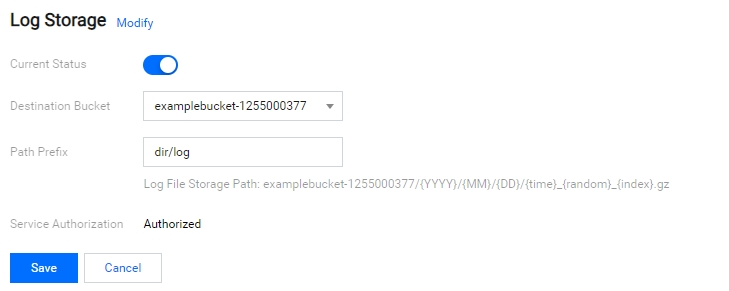
- Destination Bucket: The source bucket with enabled log management and the destination bucket for storing logs should be in the same region. We do not recommend that you set the source bucket as the bucket for storing logs.
- Path Prefix: Type a custom path prefix to make it easier for you to find logs. If it is left blank, it will be the root path of the destination bucket by default.
- Service Authorization: Authorize the CLS product services to ship access logs to your bucket.
After confirming that the information is correct, click Save. Then, the log management feature is enabled.
Note:
It might take several minutes or longer for the logs to be generated and shipped to the destination bucket. Please wait for a moment.
Find the destination bucket you configure for storing logs, and you will see the generated log files.
After downloading the log files, you can view them according to the field description.
