

Overview
You can use the COS console to add policies for a bucket to allow/deny an account or a source IP address (or IP range) access to the COS resources set by the policies. The following describes in detail how to add bucket policies.
Note:
For each root account, the total number of object ACL, bucket ACL, and bucket policies that can be created is up to 1,000.
Directions
Log in to the COS console.
In the left sidebar, click Bucket List.
Select the bucket you want to add a bucket policy to go to the bucket page.
Select Permission Management > Policy Permission Settings. COS provides two ways to add bucket policies: Graphical Settings and Policy Syntax. You can choose one of them to add bucket policies.

- Graphical Settings
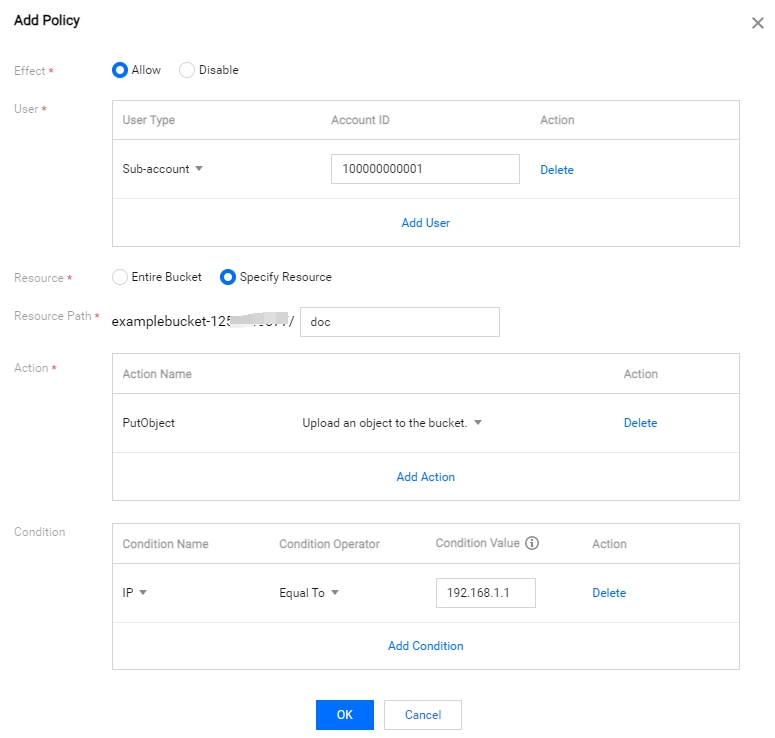
The sample settings are shown below:
- Policy Syntax
Click Modify and type the policy syntax you define.

- Graphical Settings
After confirming that the configuration is correct, click Save. Then, if you use a sub-account to log in to the COS Console, you can only access the resources set by the policy.
