

Overview
COS allows you to set access permissions based on the object dimension, and such permissions have a higher priority than those for buckets. You can set the following two types of permissions for objects in COS:
- Public Permission: Includes Inherit, Private Read/Write, and Public Read/Private Write.
- User Permission: The root account has all permissions (full control) on the objects by default. In COS, you can also add sub-accounts and grant them permissions, including read/write data, read/write permissions, and even Full Control, namely the highest permission level.
Note:
The access permissions of the object are only valid when the user accesses it through the default domain name. Subject to the bucket access permission when accessing through a custom domain name.
Directions
- Log in to the COS console.
- In the left sidebar, click Bucket List, and click the name of the bucket where the object is located to go to the bucket file list page.
- Find the object you want to set permissions and click Details on the right.

- In Object Access Permission configuration, after modifying the access permissions, click Save.
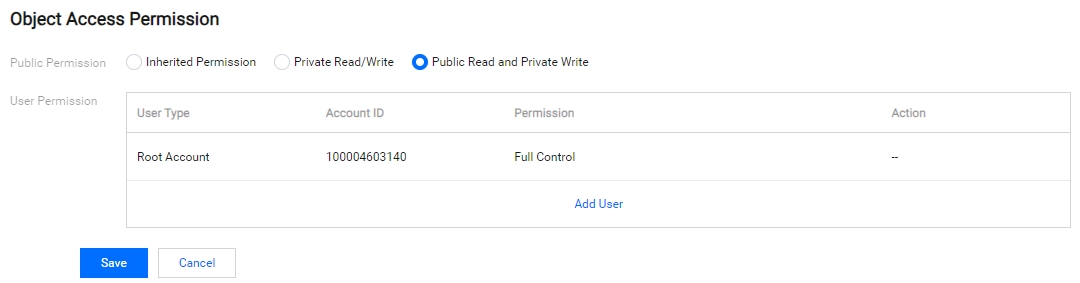
The COS supports two types of permissions for objects:- Public permissions: Include Inherit, Private Read/Write, and Public Read/Private Write.
- User permissions: The root account has all permissions (full control) on the objects by default. In COS, you can also add sub-accounts and grant them permissions, including read/write data, read/write permissions, and even full control, namely the highest permission level.
- If you need to set or modify access permissions for multiple objects in batches, you can check multiple objects, and click More Action > Modify Access Permission at the top to set it.

