

Overview
The HTTP header of an object is a string sent by the server before it transmits the HTML data to the browser over the HTTP protocol. By modifying HTTP headers, you can change the response form of the page or pass on configuration information, for example, to modify the caching time. Modifying the HTTP headers of an object will not modify the object itself.
For example, if the Content-Encoding in the header is modified to gzip, but the file itself has not been compressed with gzip in advance, then a decode error will occur.
Operation Steps
Log in to the COS bucket console.
In the left sidebar, select Bucket List to go to the bucket list page.
Click the bucket where the object is located to enter the bucket file list.
Find the object you need to set the header for and click Details on the right side of the object.

In the Custom Headers configuration, click Add Header, select the parameter type you need to set (for Custom Content, enter a custom name), and enter the corresponding value.
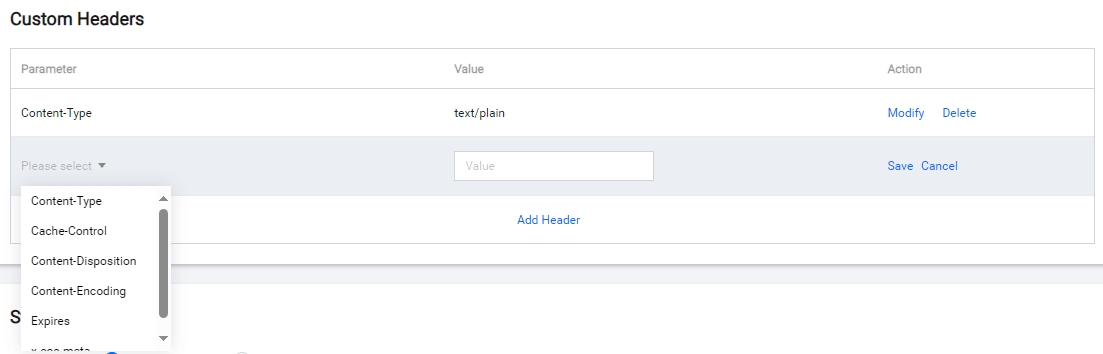
COS offers the following 6 types of object HTTP header identifiers for configuration. The header configuration is as follows.
| HTTP Header | Description | Example |
|---|---|---|
| Content-Type | MIME information of the file. | image/jpeg |
| Cache-Control | Caching mechanism of the file. | no-cache;max-age=200 |
| Content-Disposition | Extension of the MIME protocol. | attachment;filename="fname.ext" |
| Content-Encoding | Encoding format of the file. | UTF-8 |
| Expires | To control the expiration date of the cache. | Wed, 21 Oct 2015 07:28:00 GMT |
| x-cos-meta-[Custom Content] | Custom content. | Custom content. |
- After completing the configuration, click Save.
Example
For APPID as 1250000000, create a bucket named examplebucket-1250000000. In the root directory of the bucket, an object exampleobject.txt was uploaded.
When not customizing an object's HTTP headers, the range of object headers obtained by the browser or client during download is as follows:
Request
GET /exampleobject.txt HTTP/1.1
Host: <bucketname-appid>.<Endpoint>
Accept: */*
Response
HTTP/1.1 200 OK
Content-Language:zh-CN
Content-Type: text/plain
Content-Disposition: attachment; filename*="UTF-8''exampleobject.txt"
Access-Control-Allow-Origin: *
Last-Modified: Tue, 11 Jul 2017 15:30:35 GMT
Add the following configurations:
Initiate the request again, the object header example received by the browser or client is as follows:
Request
GET /exampleobject.txt HTTP/1.1
Host: <bucketname-appid>.<Endpoint>
Accept: */*
Response
HTTP/1.1 200 OK
Content-Language:zh-CN
Cache-Control: no-cache
Content-Type: image/jpeg
Content-Disposition: attachment; filename*="abc.txt"
x-cos-meta-md5: 1234
Access-Control-Allow-Origin: *
Last-Modified: Tue, 11 Jul 2017 15:30:35 GMT