

Creating a Customer Gateway
Before creating a VPN channel, you need to create a customer gateway:
- Log in to the cloud platform and select Cloud Products > Cloud Computing & Networking > Virtual Private Cloud to enter the Virtual Private Cloud console.
- In the directory on the left, click VPN Connection > Customer Gateway to enter the Customer Gateway interface.
- Select a region, and click Create.

- Fill in the customer gateway name (for example, TomVPNUserGw) and the public network IP of the IDC VPN gateway, for example, 202.108.22.5.
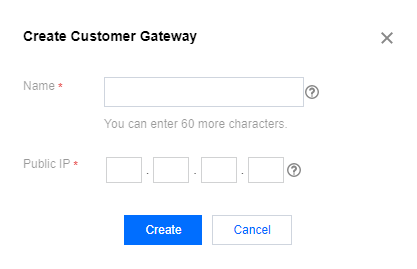
- Click Create.
Querying a Customer Gateway
Supports quick search by customer gateway name or ID.
- Enter the Customer Gateway management interface.
The channel list shows all customer gateway information. - Query the customer gateway in the search box in the upper right corner of the channel list.
- (Optional) Click Display Column Settings next to the search box to set the customer gateway parameters to be displayed.
- Click the customer gateway ID to enter the Basic Information interface and query details of the customer gateway.
Deleting a Customer Gateway
For customer gateways that are no longer in use, you can delete them from the customer gateway list.
- Enter the Customer Gateway management interface.
- Find the customer gateway to be deleted in the channel list, and then click Delete in the Operation column.
- Click OK in the Confirm Deletion dialog box.