

Below are the specific steps for purchasing VPN.
- Log in to the cloud platform and choose Cloud Products > Cloud Computing & Networking > Virtual Private Cloud to go to the VPC console.
- In the directory on the left side, choose VPN Connection > VPN Gateway to go to the VPN Gateway management interface.
- Select a region and click Create.
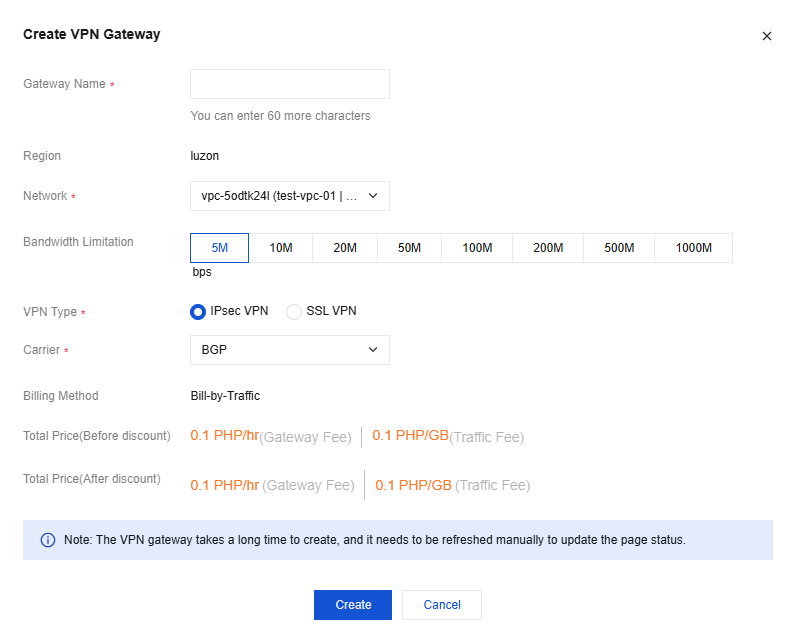
- In the pop-up dialog box, configure the following parameters and click Create.
- Gateway Name: Enter the VPN gateway name, which should not exceed 60 characters.
- Network: Select the VPC network to which the VPN gateway belongs as needed.
- VPN Type: IPSec and SSL are supported.
- Max. Bandwidth: Select the bandwidth limit of the VPN gateway as needed.
- Billing Method: Currently, only traffic-based billing is supported. This billing method is suitable for scenarios with significant bandwidth fluctuations.
Note:
VPN gateways with bandwidth above 100 Mbps should use DPDK hosts. If the option for bandwidth above 100 Mbps is not displayed on the Purchase page, contact the cloud platform's technical support personnel for assistance.