

Creating an SSL Client
Click SSL Client to enter the SSL client interface.
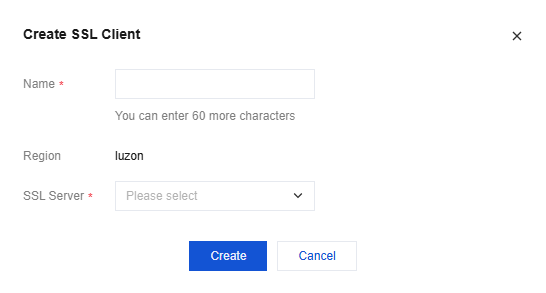
Click New, fill in the SSL client name in the New SSL Client dialog box, select the SSL Server created in step 6, and then click Create.
Click Download Configuration. The certificate is used to verify the identity with the server.
The user establishes a connection with the VPN Gateway using a certificate and key. The user side verifies the server certificate, and the server verifies the client certificate. After verification, the server allocates an IP from the Client IP Address Pool to the user. This IP is used for communication with the VPC-internal VM.
Querying an SSL Client
Supports fast search by SSL client name or ID.
- Enter the SSL Client management interface.
The channel list shows all SSL client information. - In the upper right corner of the SSL client list, use the search box to query SSL clients.
- (Optional) Click Display Column Settings next to the search box to set the SSL client parameters to be displayed.
- Click the SSL client ID to enter the Basic Information interface and query details of the SSL client.
Deleting an SSL Client
You can delete SSL clients that are no longer used from the list.
- Enter the SSL Client management interface.
- Find the SSL client to be deleted in the SSL client list, and then click Delete in the Operation column.
- Click OK in the Confirm Deletion dialog box.