

Overview
The implementation of the object tag feature is to assist users in grouping and managing objects in the storage bucket by adding a key-value pair form of identification to the object. The object tag is composed of the tagKey and the tagValue connected to=, for example, group = IT. Users can set, query, and delete tags for specified objects.
You need to pay attention to the following use limits of tags:
- Users can add up to 10 object tags for the same object, and tags cannot be repeated.
- The tag keys are not recommended to begin with qcs: or project. These characters are reserved for system tag keys.
- Tag keys and tag values support characters in UTF-8 format, spaces, numbers, and special characters + - = ._ : / @. The length range is 1-127 characters and they are case sensitive.
Adding Tags When Uploading Objects
You can add it when uploading an object, as shown in the following figure:
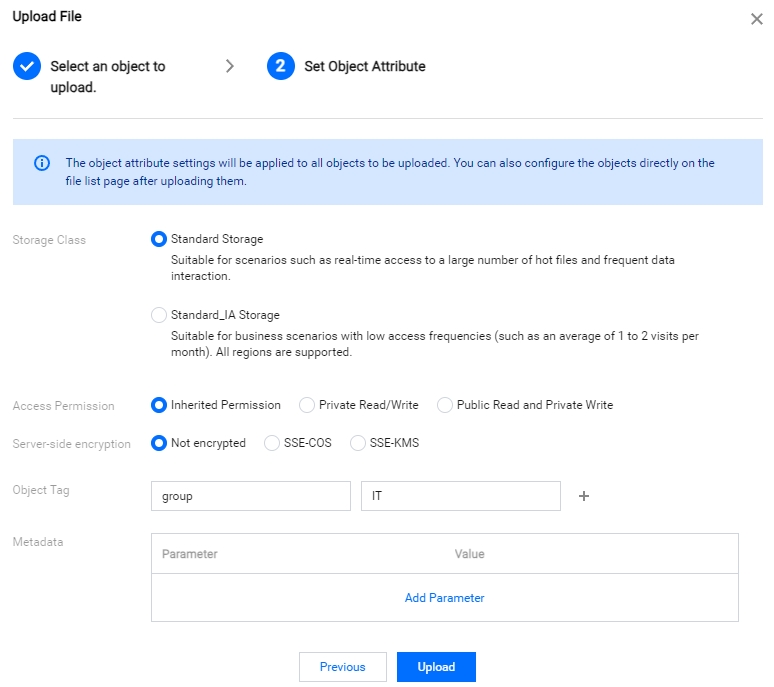
After the upload is successful, the object tag is added.
You can go to Object Tag Management in the object details page to view the added tags: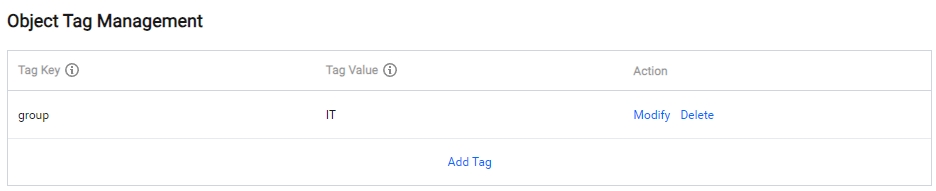
If you need to modify or delete a tag, you can go to the configuration item of Object Tag Management and click Modify or Delete on the right side of the tag.
Adding Tags to Uploaded Objects
If you did not add tags when you uploaded the object, you can add tags to the object by following the steps below.
- See View Object Information to enter the object details page where you want to add tags.
- In the Object Tag Management configuration item on the object details page, click Add Tag to add a tag to the object.
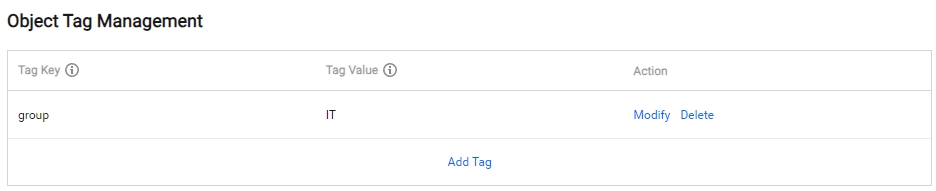
Adding Tags to Existing Objects
If you need to modify or delete a tag, you can go to the configuration item of Object Tag Management and click Modify or Delete on the right side of the tag.